Choose Your Package
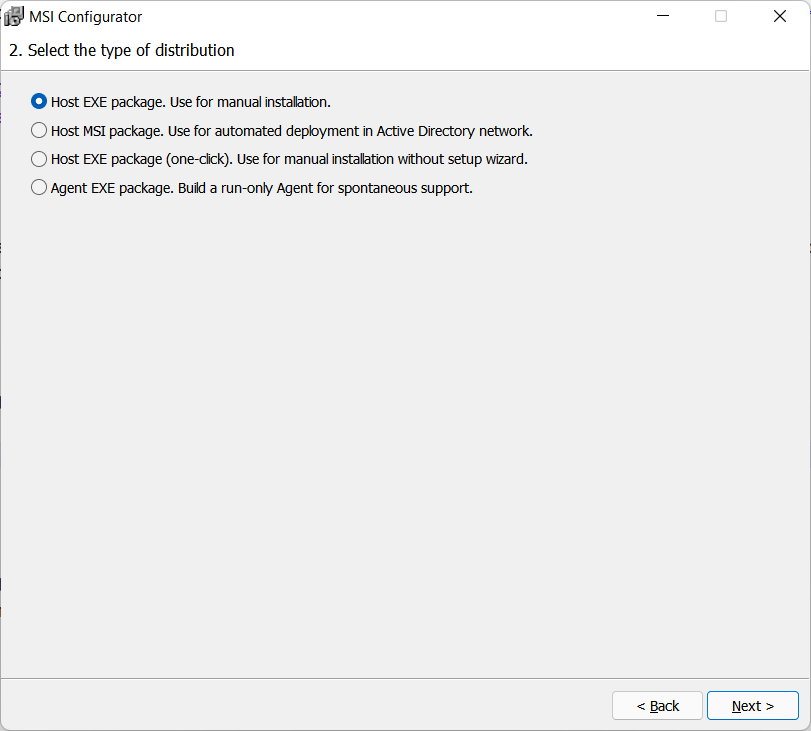
MSI Configurator allows you to build three types of Host packages and one type of Agent package. You can select the type of package in Step 2 of the configuration process:
The table below shows what packages are suitable for which task or scenario.
| Task | EXE | MSI | EXE (One-click) | Agent |
| Manual installation/run1 | ||||
| Automated deployment (e.g. using GPO) | ||||
| Unattended and attended access | ||||
| Attended-only access | ||||
| Add logo and welcome text | ||||
| Hidden installation2 |
1. All Host packages require installation and admin privileges. Agent is run-only—no installation and admin privileges are required.
2. The EXE/MSI package can be used with the standard means of silent installation (e.g. /quiet or /qn options). The one-click EXE package installs in the background—however, a prompt is still shown in the beginning asking for user consent.