Community
Beta testing: Remote Utilities for macOS/Linux
Links used in this discussion
Links used in this discussion
- https://www.remoteutilities.com/product/release-notes.php#macos
- https://www.remoteutilities.com/blog/remote-utilities-v7.5/
- https://www.remoteutilities.com/download/mac.php
- https://www.remoteutilities.com/download/linux.php
- https://www.remoteutilities.com/about/blog/Remote_Utilities/viewer-for-mac-linux/
- https://www.remoteutilities.com/support/docs/security/#Authorization
- https://www.remoteutilities.com/download/
- https://www.remoteutilities.com/download/beta.php
- https://www.remoteutilities.com/support/docs/security/#Single_password
- https://www.remoteutilities.com/support/docs/security/#Remote_Utilities_security
- https://www.remoteutilities.com/support/kb/full-control-and-view-mode-isn-t-working-or-is-unstable/
- https://www.remoteutilities.com/support/docs/host-options/#Other
- https://www.remoteutilities.com/support/docs/security/
- https://www.remoteutilities.com/support/docs/full-control-and-view/
- https://www.remoteutilities.com/support/free.php
- https://www.remoteutilities.com/support/docs/registering-the-program/
- https://www.remoteutilities.com/support/forums/forum11/1399-viewer-for-mac-and-linux-_-beta-testing?
- https://www.remoteutilities.com/support/kb/what-is-a-direct-connection/
- https://www.remoteutilities.com/support/kb/what-is-an-internet-id-connection/
- https://www.remoteutilities.com/support/kb/cannot-connect-using-internet-id-connection/
- https://www.remoteutilities.com/support/kb/remote-utilities-is-mistakenly-detected-as-malware/
- https://www.remoteutilities.com/support/docs/host-log/
- https://www.remoteutilities.com/support/docs/agent/
- https://www.remoteutilities.com/support/docs/host/
- https://www.remoteutilities.com/product/release-notes.php
- https://www.remoteutilities.com/support/docs/file-transfer/
- https://www.remoteutilities.com/support/forums/forum11/1399-viewer-for-mac-and-linux-_-beta-testing
- https://www.remoteutilities.com/about/eula.php
- https://www.remoteutilities.com/about/support-policy.php
- https://www.remoteutilities.com/support/docs/terminal/
- https://www.remoteutilities.com/buy/upgrade-form.php
- https://www.remoteutilities.com/support/docs/updating-remote-utilities/
- https://web.archive.org/web/20220324124107/https://www.remoteutilities.com/download/linux.php
- https://www.remoteutilities.com/buy/sales-inquiry.php
- https://www.remoteutilities.com/support/forums/forum11/2496-host-agent-for-linux-alpha-preview
- https://www.remoteutilities.com/support/docs/editing-connections/#Additional_properties
- https://rentry.co/remotemacos/raw
- https://packages.debian.org/
- https://www.remoteutilities.com/download/host1.0.23.b23.tar.xz

Conrad Sallian,
Support (Posts: 3238)
Sep 03, 2025 9:25:24 am EDT
Hello,
A new beta update is now available:
The Host for macOS is coming very soon.
The Agents for both macOS and Linux remain at beta 19 for now. We’ll update them together with the Host for macOS release.
Thanks!
A new beta update is now available:
- Viewer for macOS and Linux – fixed several stability issues.
- Host for Linux – released at last! Feel free to download, test it, and share your feedback.
The Host for macOS is coming very soon.
The Agents for both macOS and Linux remain at beta 19 for now. We’ll update them together with the Host for macOS release.
Thanks!
Conrad Sallian,
Support (Posts: 3238)
Sep 03, 2025 9:36:29 am EDT
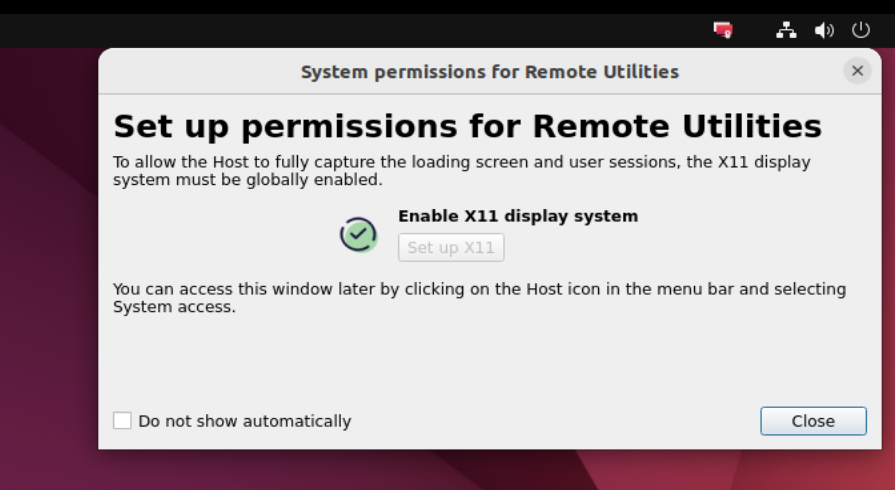
For those who install Host linux, please make sure you enable the X11 display system as Wayland isn't fully supported. You can use the Host right-click menu -> System access to enable X11 display system.
Usefull command line keys:
sudo ./r-host -install
sudo ./r-host -uninstall
sudo ./r-host -start
sudo ./r-host -stop
sudo ./r-host -config
Usefull command line keys:
sudo ./r-host -install
sudo ./r-host -uninstall
sudo ./r-host -start
sudo ./r-host -stop
sudo ./r-host -config
Jim Tracey,
User (Posts: 30)
Sep 03, 2025 11:17:35 am EDT
Support level: Free or trial
Conrad,
I just installed this on Zorin OS (Ubuntu Linux based). Install was flawless and my initial reaction is very positive. I'm looking forward to the arrival of its sister for Mac.
I just installed this on Zorin OS (Ubuntu Linux based). Install was flawless and my initial reaction is very positive. I'm looking forward to the arrival of its sister for Mac.
Jim Tracey,
User (Posts: 30)
Sep 03, 2025 8:47:56 pm EDT
Support level: Free or trial
Going through some testing I've found that if the remote Linux machine is restarted or logged out it cannot be logged into remotely. RU connects, but the screen is blank and must be logged in locally before it can be accessed remotely. I wonder if it's related to Wayland, but that's a guess.
Benny Tucker,
User (Posts: 55)
Sep 04, 2025 5:49:48 pm EDT
Support level: Plus
Good evening RU.
Just a couple of questions related to the Linux host.
1. I'm brand new to Linux, but I do have one machine with Ubuntu running at the moment.
My question is, can the Windows version of Viewer be used to connect to this machine, or does it have to be the Linux version? I tried this scenario last evening, and the Ubuntu host would show up in both my RU Server, and also in the viewer it showed as online, but not logged in.
As soon as I clicked on the connection to connect, the status would immediately change to offline.
2. The X11 protocol is not compatible with my version of Ubuntu, on my current older machine. The version of Ubuntu I have is the latest desktop version, but the computer it's installed on is Windows 7 era.
After enabling X11, it crashed Ubuntu, and the only way to get it back was to perform recovery actions to re-enable Wayland.
I'm trying to learn all I can about Linux. Just mostly wanted to know if the Win Viewer would play nice with the Linux host?
Thank You for your time!!
Benny
Just a couple of questions related to the Linux host.
1. I'm brand new to Linux, but I do have one machine with Ubuntu running at the moment.
My question is, can the Windows version of Viewer be used to connect to this machine, or does it have to be the Linux version? I tried this scenario last evening, and the Ubuntu host would show up in both my RU Server, and also in the viewer it showed as online, but not logged in.
As soon as I clicked on the connection to connect, the status would immediately change to offline.
2. The X11 protocol is not compatible with my version of Ubuntu, on my current older machine. The version of Ubuntu I have is the latest desktop version, but the computer it's installed on is Windows 7 era.
After enabling X11, it crashed Ubuntu, and the only way to get it back was to perform recovery actions to re-enable Wayland.
I'm trying to learn all I can about Linux. Just mostly wanted to know if the Win Viewer would play nice with the Linux host?
Thank You for your time!!
Benny
Conrad Sallian,
Support (Posts: 3238)
Sep 04, 2025 6:38:39 pm EDT
Hello Jim,Jim Tracey wrote:
Going through some testing I've found that if the remote Linux machine is restarted or logged out it cannot be logged into remotely. RU connects, but the screen is blank and must be logged in locally before it can be accessed remotely. I wonder if it's related to Wayland, but that's a guess.
Thanks for the feedback. Have you enabled x11 on the Linux machine?
Conrad Sallian,
Support (Posts: 3238)
Sep 04, 2025 6:42:05 pm EDT
Hello Benny,Benny Tucker wrote:
Thank you for the feedback.
1. No, Viewer doesn't have to be a Linux version. You can connected between OSes in various combinations. Namely, you can connect from Windows Viewer to Linux Host.
2. Unfortunately, Wayland has some built-in limitations as to letting remote access control. However, we will explore this topic closer and there's a chance that we will add Wayland support in the future.
Thanks.
Conrad Sallian,
Support (Posts: 3238)
Sep 14, 2025 3:09:51 pm EDT
We have released beta 22 for Linux (Viewer/Host) and macOS (Viewer). Fixed some stability issues, namely program occasionally crashed.
Thanks.
Thanks.
Phil Burgess,
User (Posts: 1)
Oct 09, 2025 6:20:36 pm EDT
Support level: Free or trial
We currently use Remote Utilities on Windows clients but use a different solution on Windows servers. We are looking to use Remote Utilities on servers too.
However in testing clipboard support is not available from the Linux viewer.
Clipboard transfer is the most critical feature missing for us. File transfer we can live without.
Is there any timeline for clipboard support in Linux and Mac viewers ?
However in testing clipboard support is not available from the Linux viewer.
Clipboard transfer is the most critical feature missing for us. File transfer we can live without.
Is there any timeline for clipboard support in Linux and Mac viewers ?

Hello Phil,
Thank you for your message.
Clipboard copy/paste functionality is definitely planned and will be available in the final stable release of Remote Utilities for Linux/Mac.
Unfortunately, we're not able to provide a specific ETA for that release just yet.
Hope that helps.
Thank you for your message.
Clipboard copy/paste functionality is definitely planned and will be available in the final stable release of Remote Utilities for Linux/Mac.
Unfortunately, we're not able to provide a specific ETA for that release just yet.
Hope that helps.
* Website time zone: America/New_York (UTC -4)