Conrad Sallian's community posts
Norton preventing Host install
Username/Password Loop
Hello Steven,
Thank you for your post.
The fact that Viewer asks for password means that connectivity is ok, and you only need to log in/authorize on the remote Host. However, what login (if any) and password you need to enter depends on what you chose in your Host settings as the authorization method.
Namely, the default authorization method is "Remote Utilities security" single password authorization. When you were installing the Host you should have received a password creation prompt window:
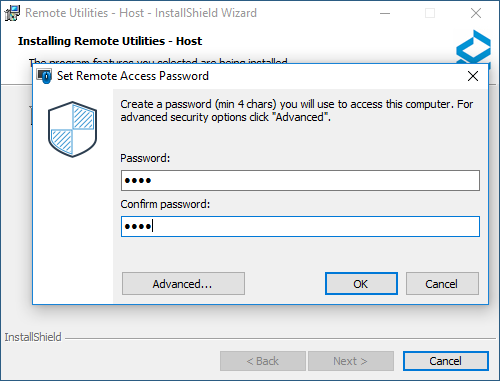
This is where you set the single (master) Host password. Then when you connect to the freshly installed Host the Viewer will ask you for that password in order to let you in.
In addition to single-password security there are more advanced types, namely Users and Access Control and WinNT security. The single password and users and access control (jointly known as "Remote Utilities security") on the one hand and WinNT security on the other hand are mutually exclusive, at least in the current version. Perhaps in the upcoming release we will let the users enable them both simultaneously and thus be able to login in different ways without changing the Host settings first.
To summarize, if you have "Remote Utilities Security" selected as the authorization method in your Host security settings, you need to either enter your single-password, or login and password IF you enabled "Users and Access Control".
If you enabled WinNT security authorization method, then you must enter your Windows credentials, and the password prompt window looks differently in this case.
Hope that helps. Let me know if you have any questions.
Thank you for your post.
The fact that Viewer asks for password means that connectivity is ok, and you only need to log in/authorize on the remote Host. However, what login (if any) and password you need to enter depends on what you chose in your Host settings as the authorization method.
Namely, the default authorization method is "Remote Utilities security" single password authorization. When you were installing the Host you should have received a password creation prompt window:
This is where you set the single (master) Host password. Then when you connect to the freshly installed Host the Viewer will ask you for that password in order to let you in.
In addition to single-password security there are more advanced types, namely Users and Access Control and WinNT security. The single password and users and access control (jointly known as "Remote Utilities security") on the one hand and WinNT security on the other hand are mutually exclusive, at least in the current version. Perhaps in the upcoming release we will let the users enable them both simultaneously and thus be able to login in different ways without changing the Host settings first.
To summarize, if you have "Remote Utilities Security" selected as the authorization method in your Host security settings, you need to either enter your single-password, or login and password IF you enabled "Users and Access Control".
If you enabled WinNT security authorization method, then you must enter your Windows credentials, and the password prompt window looks differently in this case.
Hope that helps. Let me know if you have any questions.
Few questions regarding some functions and purchasing
Hello,
1. Looks like you use RDP connection mode instead of Remote Utilities's own Full Control and View mode. Is that the case?
2. Please, open a support ticket. Perhaps, we'll need to schedule a remote session to see it with our own eyes because in our tests it all works.
Thanks.
1. Looks like you use RDP connection mode instead of Remote Utilities's own Full Control and View mode. Is that the case?
2. Please, open a support ticket. Perhaps, we'll need to schedule a remote session to see it with our own eyes because in our tests it all works.
Thanks.
Access violation error?
Hello Riley,
Your Viewer configuration files could have been corrupted. Please, check out this troubleshooting article https://www.remoteutilities.com/support/docs/access-violation-error-in-the-viewer/
Your Viewer configuration files could have been corrupted. Please, check out this troubleshooting article https://www.remoteutilities.com/support/docs/access-violation-error-in-the-viewer/
Few questions regarding some functions and purchasing
Hello Decha,
Thank you for your message.
1. Do you have a chance to see what is happening on the physical remote monitor screen at this moment?
2. Looks like you have some sort of insufficient rights or maybe your Host was not installed properly. You can try to completely uninstall Host (make sure you also delete the registry entry with its settings) and install from scratch. When installing make sure you are a full administrator. Also, if you have any antivirus software installed add Remote Utilities Host installation path to antivirus software exceptions.
3. We have "per operator" and "per remote PC" licenses. The word user is used interchangeably with "operator" and "technician". It is someone who sits on the Viewer side and actually uses the software for the purpose it was designed.
Sometimes, if we need to distinguish between user-operator and the user sitting at the remote side during an attended session, we simply say "remote user".
You pay for your main license once. You receive free minor updates and one year of free major upgrades. You can use your current software version forever, but if you want , you can upgrade it in a few years at a fraction of the cost. There are no mandatory upgrades - you only upgrade if you yourself decide so. Here is our Upgrade Policy.
Hope that helps.
Thank you for your message.
1. Do you have a chance to see what is happening on the physical remote monitor screen at this moment?
2. Looks like you have some sort of insufficient rights or maybe your Host was not installed properly. You can try to completely uninstall Host (make sure you also delete the registry entry with its settings) and install from scratch. When installing make sure you are a full administrator. Also, if you have any antivirus software installed add Remote Utilities Host installation path to antivirus software exceptions.
3. We have "per operator" and "per remote PC" licenses. The word user is used interchangeably with "operator" and "technician". It is someone who sits on the Viewer side and actually uses the software for the purpose it was designed.
Sometimes, if we need to distinguish between user-operator and the user sitting at the remote side during an attended session, we simply say "remote user".
One last thing. Do we have to renew licence yearly or is it really lifetime?
You pay for your main license once. You receive free minor updates and one year of free major upgrades. You can use your current software version forever, but if you want , you can upgrade it in a few years at a fraction of the cost. There are no mandatory upgrades - you only upgrade if you yourself decide so. Here is our Upgrade Policy.
Hope that helps.
Hosts unavailable

Conrad Sallian,
Support (Posts: 3210)
Apr 26, 2016 11:36:14 am EDT
No problem, Jerry. Thank you.
Wake on LAN - what settings need to be done at the Host?
Conrad Sallian,
Support (Posts: 3210)
Apr 26, 2016 11:35:24 am EDT
Hello Herb,
Thank you for your message.
If you use it on a LAN and it still doesn't work, make sure that your network card on the remote PC supports WoL and it's enabled.
Thank you for your message.
Idle or Offline, you mean? In the upcoming release, we'll revamp the statuses and add a "true" online status for ID connections. So far we have to combine both idle and offline states/statuses in one status due to program design.7 of them work perfectly fine with RU even if they show "Offline"
Parallel bars were discontinued a few updated ago. Now hourglass is used. So make sure you have the most recent version installed, both Viewer and Hosts. As of this post, the most recent version is 6.3.0.6.But 3 of them are "asleep" and cannot be called up in RU. Double clicking their icon (showing "Offline") makes it go to a "||" for a moment then returns to "Offline".
"Wake on LAN" works only in a LAN. It doesn't work over the Internet, at least not in Remote Utilities.At the host, what provisions do I need to make or install have Wake On LAN work? Are there settings outside of RU that I need to invoke?
If you use it on a LAN and it still doesn't work, make sure that your network card on the remote PC supports WoL and it's enabled.
Audit Trail
Conrad Sallian,
Support (Posts: 3210)
Apr 21, 2016 8:17:58 am EDT
Hello Bill,
There is a Host log available in C:\Program Files\Remote Utilities - Host\Logs\ with mostly connection/technical and error information.
As for auditing purposes, we will implement a special reporting module at some point in the future.
There is a Host log available in C:\Program Files\Remote Utilities - Host\Logs\ with mostly connection/technical and error information.
As for auditing purposes, we will implement a special reporting module at some point in the future.
Hosts unavailable
Conrad Sallian,
Support (Posts: 3210)
Apr 21, 2016 8:13:14 am EDT
Hello Jerry,
I will request our development team regarding this. Looks like this issue should be fixed in the upcoming version, but I need to check for sure.
Regarding other software comparisons - they are not allowed on this forum. We reserve the right to delete or censor such messages. Thank you for your understanding.
I will request our development team regarding this. Looks like this issue should be fixed in the upcoming version, but I need to check for sure.
Regarding other software comparisons - they are not allowed on this forum. We reserve the right to delete or censor such messages. Thank you for your understanding.
Hosts unavailable
Conrad Sallian,
Support (Posts: 3210)
Apr 21, 2016 7:55:11 am EDT
Hello Alan,
Thank you for your message.
There were neither any downtimes of our servers, nor any changes to the program. Remote Utilities simply doesn't have any auto-update capabilities, so even if we released a new update that wouldn't affect your installations.
We will check information about black listing. However, our servers always have a static IP address - for example, our primary server as well as secondary servers didn't change its IP address for years, and the server itself is the only application/service that is running there. So it would be rather strange if that IP address were added to a black list - there's simply no email or web service there to host anything malicious (even if we hypothesize so :) ).
It would also help looking at your Host log files. Could you please submit a ticket and attach your Host logs to the ticket. Perhaps, the Host can't connect to the intermediaries because of a DNS issue or something else. But we need to take a look at the logs to be sure.
Thank you for your message.
There were neither any downtimes of our servers, nor any changes to the program. Remote Utilities simply doesn't have any auto-update capabilities, so even if we released a new update that wouldn't affect your installations.
We will check information about black listing. However, our servers always have a static IP address - for example, our primary server as well as secondary servers didn't change its IP address for years, and the server itself is the only application/service that is running there. So it would be rather strange if that IP address were added to a black list - there's simply no email or web service there to host anything malicious (even if we hypothesize so :) ).
It would also help looking at your Host log files. Could you please submit a ticket and attach your Host logs to the ticket. Perhaps, the Host can't connect to the intermediaries because of a DNS issue or something else. But we need to take a look at the logs to be sure.