Conrad Sallian's community posts
Access violation when ending session

Hello John,
I moved this discussion to support tickets so that we could forward it to our 2nd tier support. You should have received an email by now about creating a new ticket.
Your tickets are available here https://www.remoteutilities.com/support/tickets/ (log in required).
I moved this discussion to support tickets so that we could forward it to our 2nd tier support. You should have received an email by now about creating a new ticket.
Your tickets are available here https://www.remoteutilities.com/support/tickets/ (log in required).
Access violation when ending session
Hi John,
The trick is that you should completely uninstall the Viewer. Alternatively, you can just navigate to C:\Users\YOUR_USERNAME\AppData\Roaming\Remote Utilities Files\ (exit the Viewer first) and delete the file config_4.xml. This file contains Viewer options - in most cases the error appears because of the corrupted file.
Then start the Viewer again and see if the error persists.
The trick is that you should completely uninstall the Viewer. Alternatively, you can just navigate to C:\Users\YOUR_USERNAME\AppData\Roaming\Remote Utilities Files\ (exit the Viewer first) and delete the file config_4.xml. This file contains Viewer options - in most cases the error appears because of the corrupted file.
Then start the Viewer again and see if the error persists.
Viewer can't not get host PC screen(got a black screen)
Hi Ian,
Thank you for your post.
There may be different reasons that cause the issue, but first and foremost you should try to restart your remote Host PC if you didn't do so after Host installation.
Otherwise, please check out other solutions listed in this article:
https://www.remoteutilities.com/support/docs/full-control-and-view-mode-isnt-working-or-unstable/
Let me know if you need further assistance.
Thank you for your post.
There may be different reasons that cause the issue, but first and foremost you should try to restart your remote Host PC if you didn't do so after Host installation.
Otherwise, please check out other solutions listed in this article:
https://www.remoteutilities.com/support/docs/full-control-and-view-mode-isnt-working-or-unstable/
Let me know if you need further assistance.
Access violation when ending session
Hello John,
Thank you for your message.
Most likely your Viewer configuration files are corrupted somehow. They are stored in your user account folder rather than in the program installation folder.
Here is a related troubleshooting article:
https://www.remoteutilities.com/support/docs/access-violation-error-in-the-viewer/
Hope it will help.
Thank you for your message.
Most likely your Viewer configuration files are corrupted somehow. They are stored in your user account folder rather than in the program installation folder.
Here is a related troubleshooting article:
https://www.remoteutilities.com/support/docs/access-violation-error-in-the-viewer/
Hope it will help.
Connecting to Windows 8.1 From Windows 7 Mouse "Uncalibrated"
Error 2503 Called runscript when not marked in progress
Can't connect to upgraded win10
Can't connect to upgraded win10
Hello Michal,
Thank you for your message.
The reason why this happens is that the Host settings are located in the HKEY_LOCAL_MACHINE/SYSTEM/Remote Utilities key and when Windows upgrades, it resets the SYSTEM registry key values. That is why the Host settings are reset including the Internet-ID and access password.
In the upcoming 6.5 update we will change the location for the Host settings and move them into HKEY_LOCAL_MACHINE/Software key instead. So starting version 6.5 this issue will be no more.
Currently, a solution could be exporting the HKEY_LOCAL_MACHINE/SYSTEM/Remote Utilities key and after Windows has been upgraded, importing it back into the registry.
Hope that helps.
Thank you for your message.
The reason why this happens is that the Host settings are located in the HKEY_LOCAL_MACHINE/SYSTEM/Remote Utilities key and when Windows upgrades, it resets the SYSTEM registry key values. That is why the Host settings are reset including the Internet-ID and access password.
In the upcoming 6.5 update we will change the location for the Host settings and move them into HKEY_LOCAL_MACHINE/Software key instead. So starting version 6.5 this issue will be no more.
Currently, a solution could be exporting the HKEY_LOCAL_MACHINE/SYSTEM/Remote Utilities key and after Windows has been upgraded, importing it back into the registry.
Hope that helps.
FR: Linux, Mac - Host
Hello Nils,
Thank you for your commitment. But however we are interested in more sales, we cannot give promises that might not fulfill due to any unexpected delays or circumstances. We can only say that we are planning to implement a certain feature possibly within a certain time frame, but cannot give more exact information. Sorry for that.
Don't hesitate to ask me if you have other questions.
Thank you for your commitment. But however we are interested in more sales, we cannot give promises that might not fulfill due to any unexpected delays or circumstances. We can only say that we are planning to implement a certain feature possibly within a certain time frame, but cannot give more exact information. Sorry for that.
Don't hesitate to ask me if you have other questions.
Minimize to tray
Hello Claudio,
Thank you for your message. You mean the Viewer module, correct?
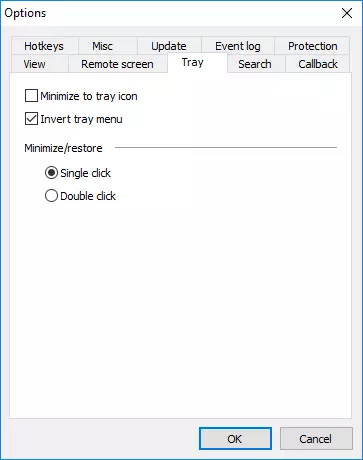
In the main Viewer window click Tools -> Options and navigate to the Tray tab. On the tab select Minimize to tray icon checkbox and click OK. You can optionally set the click behavior (invoke the Viewer window by single or double click on the icon):
Hope that helps.
Thank you for your message. You mean the Viewer module, correct?
In the main Viewer window click Tools -> Options and navigate to the Tray tab. On the tab select Minimize to tray icon checkbox and click OK. You can optionally set the click behavior (invoke the Viewer window by single or double click on the icon):
Hope that helps.