Pauline's community posts
App closes immediately on Android 11

Hello Trent,
Thank you for the provided details.
Yes, perhaps the issue might only be specific to the Google Pixel devices as we couldn't reproduce the issue yet. However, we'll continue to further test this. I'll get back to you once there are any updates on the issue or in case if our developers request some additional information.
Please let us know if you have other questions.
Thank you for the provided details.
Yes, perhaps the issue might only be specific to the Google Pixel devices as we couldn't reproduce the issue yet. However, we'll continue to further test this. I'll get back to you once there are any updates on the issue or in case if our developers request some additional information.
Please let us know if you have other questions.
App closes immediately on Android 11
Hello Trent,
Thank you for your message.
Unfortunately, we couldn't reproduce the issue yet. However, we will test it more extensively to see if the issue only manifests itself in certain conditions or if it's a common issue affecting devices after updating to Android 11. Sorry for the inconvenience.
We will get back to you as soon as there are any updates on the issue.
Thank you for your message.
Unfortunately, we couldn't reproduce the issue yet. However, we will test it more extensively to see if the issue only manifests itself in certain conditions or if it's a common issue affecting devices after updating to Android 11. Sorry for the inconvenience.
We will get back to you as soon as there are any updates on the issue.
RU Relay: where is the login user name logged?
Color and CPU Usage
Hello April,
Thank you for your message.
Unfortunately, right now there’s no direct switch to limit the CPU usage in Viewer for Mac.
However, please try enabling the Enable FPS limit checkbox and sel ect the preferred FPS value fr om the list - this would act in a similar way as if you would set the CPU usage switch to the FPS value and then selected the preferred FPS value in Viewer for Windows.
I’ll additionally forward this to our development team and ask them if there will be the same CPU usage limiting switch implemented in the future updates of the Viewer for Mac/Linux.
Please let us know if you have more questions.
Thank you for your message.
Unfortunately, right now there’s no direct switch to limit the CPU usage in Viewer for Mac.
However, please try enabling the Enable FPS limit checkbox and sel ect the preferred FPS value fr om the list - this would act in a similar way as if you would set the CPU usage switch to the FPS value and then selected the preferred FPS value in Viewer for Windows.
I’ll additionally forward this to our development team and ask them if there will be the same CPU usage limiting switch implemented in the future updates of the Viewer for Mac/Linux.
Please let us know if you have more questions.
Color and CPU Usage
Hello April,
Thank you for your message.
Unfortunately, the Beta version of the Mac/Linux Viewer has limited functionality and more features will be added at later stages. You can see the full list of currently implemented features as well as the features that are expected to be implemented in the nearest update on this page.
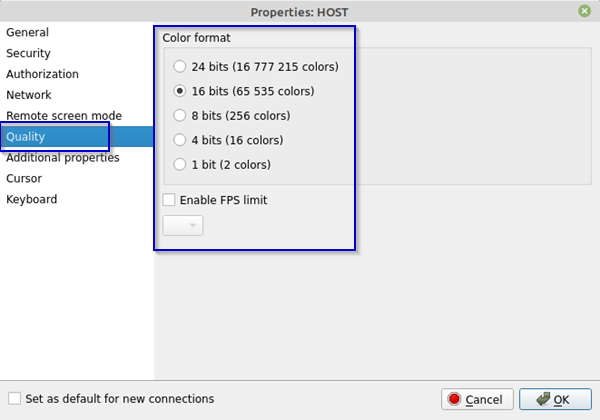
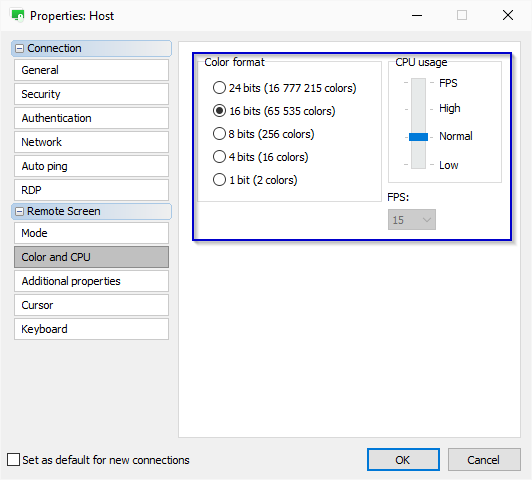
However, please note that the Color format and FPS limiting settings that are shown on the Color and CPU tab on Windows machines is displayed in the Quality tab in Viewer for Mac and Linux:
Please let us know if you have more questions.
Thank you for your message.
Unfortunately, the Beta version of the Mac/Linux Viewer has limited functionality and more features will be added at later stages. You can see the full list of currently implemented features as well as the features that are expected to be implemented in the nearest update on this page.
However, please note that the Color format and FPS limiting settings that are shown on the Color and CPU tab on Windows machines is displayed in the Quality tab in Viewer for Mac and Linux:
Please let us know if you have more questions.
Error 17: #5
RU Relay: where is the login user name logged?
Hello,
Thank you for your message.
Unfortunately, the username is not currently stored in the connection log entries. However, we already have the feature to display and store the username of the remote user and the hostname of the computer of the remote user in the connection logs in our roadmap and we will try our best to implement it as soon as possible. I'll additionally check with our developers if there's any specific ETA on when this feature can be expected.
I'll get back to you with their reply soon.
Thank you for your message.
Unfortunately, the username is not currently stored in the connection log entries. However, we already have the feature to display and store the username of the remote user and the hostname of the computer of the remote user in the connection logs in our roadmap and we will try our best to implement it as soon as possible. I'll additionally check with our developers if there's any specific ETA on when this feature can be expected.
I'll get back to you with their reply soon.
Error 17: #5
Hello Tom,
Thank you for your message.
The Error 17: #5 usually means that your NTLM user does not have enough privileges. Please, make sure that you have local admin rights on that machine. In addition, please double-check that admin$ (admin share) is allowed on the remote machine and you have access to it.
Hope that helps.
Thank you for your message.
The Error 17: #5 usually means that your NTLM user does not have enough privileges. Please, make sure that you have local admin rights on that machine. In addition, please double-check that admin$ (admin share) is allowed on the remote machine and you have access to it.
Hope that helps.
can I use self-hosted server without a license?
Hello Thomas,
Thank you for the clarification.
In case if you're experiencing such connectivity issues using both Direct and Internet-ID connection as well as when using RDP and the Full Control and View connection modes, please feel free to send us the Viewer and Host log files for examination to see if it's possible to identify what might be causing the problem. You can send the logs to support@remoteutilities.com. Unfortunately, without the log files we can't tell the exact reason for such issues as the log files are used for the connectivity troubleshooting.
Hope that helps.
Thank you for the clarification.
Please note that Direct connection can be only used in case if the remote Host machine can be addressed by its external IP address or hostname (DNS name). However, you can also establish a Direct connection over the Internet if you create a port forwarding rule in the router settings on the Host side. Please see this page for more information.Choosing Direct connection over Internet-ID does not work because some machines cannot be found by their name, and their IP addresses can change from time to time.
Please note that when using the RDP connection mode over the Internet, the RDP-over-ID feature is used automatically. In addition, please note that the RDP mode in Remote Utilities just launches the native Microsoft Remote Desktop Connection client from within Remote Utilities and connects to a remote computer using the standard RDP protocol.Using Internet-ID seemed like the most desirable method, but again, the connection status in the Viewer seems to change every time I look at it. It just keeps changing status, machines going offline and online again - unresponsive to launching a windows RDP session.
In case if you're experiencing such connectivity issues using both Direct and Internet-ID connection as well as when using RDP and the Full Control and View connection modes, please feel free to send us the Viewer and Host log files for examination to see if it's possible to identify what might be causing the problem. You can send the logs to support@remoteutilities.com. Unfortunately, without the log files we can't tell the exact reason for such issues as the log files are used for the connectivity troubleshooting.
Hope that helps.
Change Local Account to Microsoft Account
Hello Anthony,
Thank you for your message.
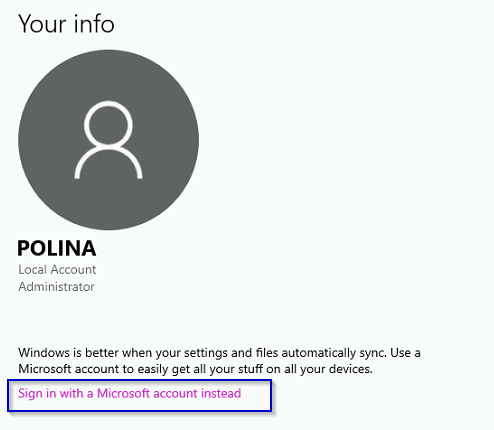
In order to switch to using the Microsoft account, please open Windows Settings and navigate to the Accounts section -> Your info tab, then select Sign in with a Microsoft account instead:
Hope that helps.
Thank you for your message.
Yes, this is possible in case if you use Host as it runs as a system service and allows to remotely control UAC prompt messages and perform administrative tasks on the remote computer.Is it possible to do this entirely remotely using Remote Utilities?
In order to switch to using the Microsoft account, please open Windows Settings and navigate to the Accounts section -> Your info tab, then select Sign in with a Microsoft account instead:
Hope that helps.