Conrad Sallian's community posts
Starter licence

Conrad Sallian,
Support (Posts: 3210)
Nov 21, 2019 8:53:01 am EST
Hello Drideanu,
Thank you for your message.
So if you are the only admin working the software at a time and you have more than 20 and less than 50 computers to control then you need a 1-tech Mini license. You can get a quotation from us using this form https://www.remoteutilities.com/buy/request-quote.php
Hope that helps.
Thank you for your message.
Actually, you can. However, this won't increase the number of remote computers you can control. In order to be able to control more machines you need to change the license type. For example, in order to control 20-50 machines your license type should be Mini, not Starter.Also I read on the forum that the I can't add multiple starter licences to one viewer.
So if you are the only admin working the software at a time and you have more than 20 and less than 50 computers to control then you need a 1-tech Mini license. You can get a quotation from us using this form https://www.remoteutilities.com/buy/request-quote.php
Hope that helps.
How to change agent server with different IP address
Conrad Sallian,
Support (Posts: 3210)
Nov 11, 2019 12:39:51 pm EST
Hello Rob,
The Internet-ID settings (including the server details) are located on each Host machine. It is possible to update them without actually re-installing the Host. However, this will need to be done one-by-one for each Host (e.g. using the remote settings).
Alternatively, you can use the re-installation method - you don't necessarily have to have GPO environment for that. You can use the Remote Install tool and update the Host using that tool. Here is the process:
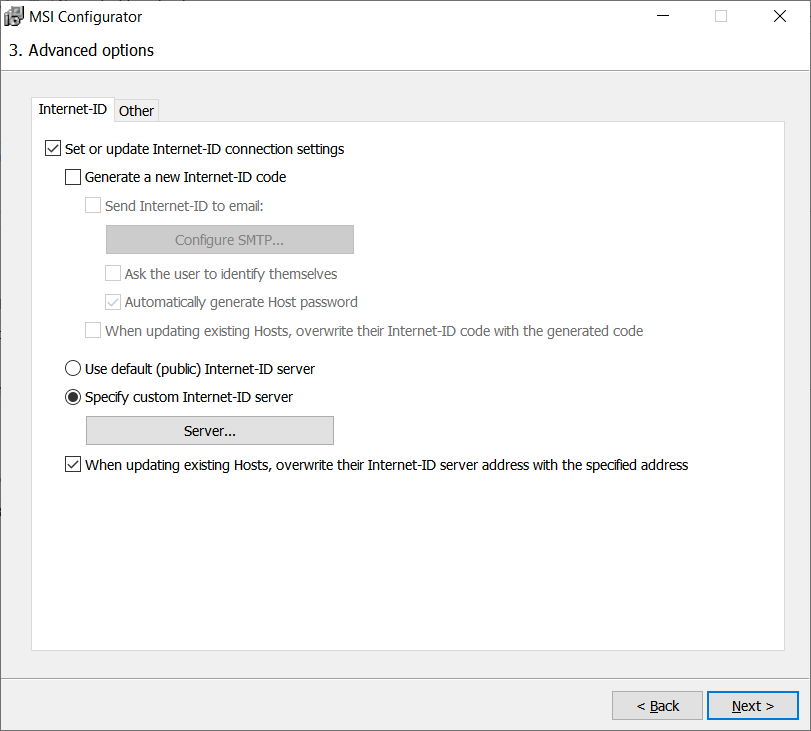
1. Build your custom Host installer ("Standard" option, i.e. an .msi file) with which to update your remote Hosts. Make sure that you specify your server details during configuration. To avoid changing your existing internet-ID codes your configuration window in Step 3 should look like this:
2. Use the Remote Install tool to "push" the Host update file to your existing Hosts and replace them. You must have connectivity with your remote Hosts. Your Remote Install window should look like this:
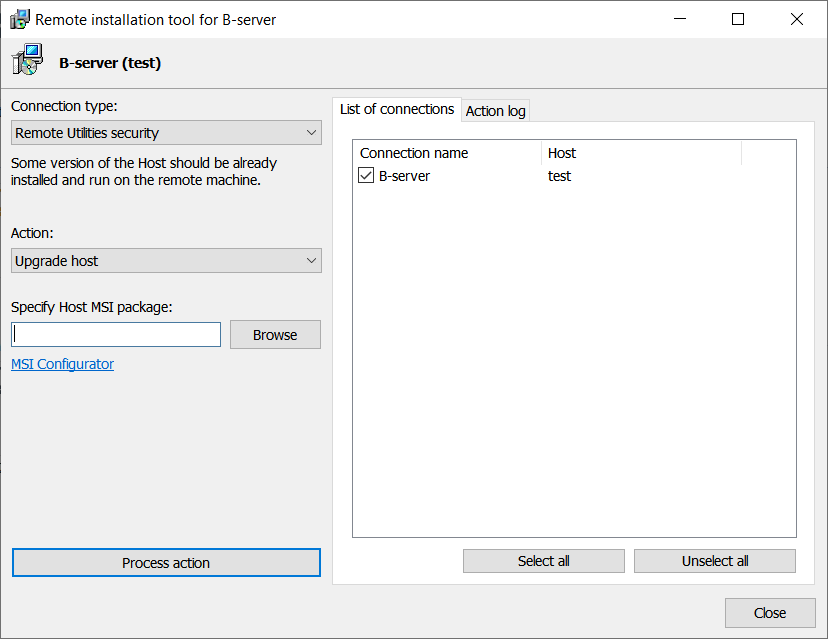
In the "Specify Host msi package" specify the path to your newly configured msi package. Then click "Process action".
Note, that you can also select multiple Hosts to be updated. However, I highly recommend that you first try this procedure with one non-critical Host to make sure that you use correct settings. Even after that I suggest you only update your Hosts in small groups, preferably no more than 10 hosts in a group.
3. Update your Viewer connection properties accordingly for each Host. You'll need to change the Internet-ID server details from "default" to your server details. Again, you can multiple-select connections in your address book and update server details for all of them.
Hope that helps.
The Internet-ID settings (including the server details) are located on each Host machine. It is possible to update them without actually re-installing the Host. However, this will need to be done one-by-one for each Host (e.g. using the remote settings).
Alternatively, you can use the re-installation method - you don't necessarily have to have GPO environment for that. You can use the Remote Install tool and update the Host using that tool. Here is the process:
1. Build your custom Host installer ("Standard" option, i.e. an .msi file) with which to update your remote Hosts. Make sure that you specify your server details during configuration. To avoid changing your existing internet-ID codes your configuration window in Step 3 should look like this:
2. Use the Remote Install tool to "push" the Host update file to your existing Hosts and replace them. You must have connectivity with your remote Hosts. Your Remote Install window should look like this:
In the "Specify Host msi package" specify the path to your newly configured msi package. Then click "Process action".
Note, that you can also select multiple Hosts to be updated. However, I highly recommend that you first try this procedure with one non-critical Host to make sure that you use correct settings. Even after that I suggest you only update your Hosts in small groups, preferably no more than 10 hosts in a group.
3. Update your Viewer connection properties accordingly for each Host. You'll need to change the Internet-ID server details from "default" to your server details. Again, you can multiple-select connections in your address book and update server details for all of them.
Hope that helps.
Remote View Event Viewer
Conrad Sallian,
Support (Posts: 3210)
Nov 05, 2019 1:04:57 pm EST
Hello Jeff,
We apologize for that overreaction. Of course you can post links to Microsoft documentation, as well as to any other non-competing tools.
Thank you for helping other users here in the community.
We apologize for that overreaction. Of course you can post links to Microsoft documentation, as well as to any other non-competing tools.
Thank you for helping other users here in the community.
Self hosted server max connections?
Conrad Sallian,
Support (Posts: 3210)
Nov 05, 2019 6:55:37 am EST
Hello Matti,
Thank you for your message.
No, there is no limit. The 1000 hosts limit that you mention is currently only an interface limitation which will be fixed soon.
Let me know if you have other questions.
Thank you for your message.
No, there is no limit. The 1000 hosts limit that you mention is currently only an interface limitation which will be fixed soon.
Let me know if you have other questions.
Android App Address Book
Conrad Sallian,
Support (Posts: 3210)
Nov 04, 2019 8:50:44 am EST
Hello David,
We do our best to release an updated mobile client as soon as possible and the work is now in progress.
We do our best to release an updated mobile client as soon as possible and the work is now in progress.
Enter, shift, ctrl and Alt keys not working from viewer to all hosts
Conrad Sallian,
Support (Posts: 3210)
Oct 30, 2019 5:16:33 am EDT
Hello Ian,
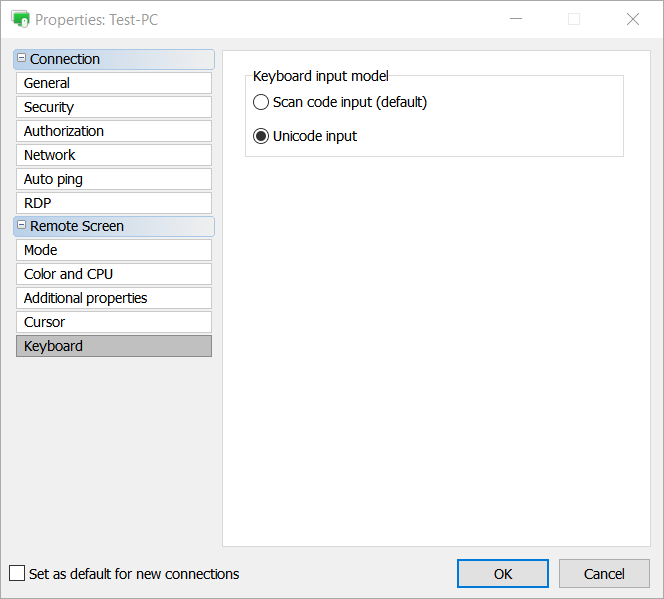
In connection properties please try switching to Unicode input and let us know if it solves the problem.
Thanks.
In connection properties please try switching to Unicode input and let us know if it solves the problem.
Thanks.
Linux (Mint) & Wine
Conrad Sallian,
Support (Posts: 3210)
Oct 30, 2019 5:13:40 am EDT
Hello Jeff,
Do you mean this message:
Sorry for any inconvenience.
Do you mean this message:
If so, I apologize for deleting it. Indeed this is a benign message and was deleted by mistake.I know this post is almost 4 years old, but it works fine on Wine. Using Debian 9. Make sure you are using the correct wine package. The one on the default apt repositories is years old. Use proper instructions from https://wiki.winehq.org/Download
Sorry for any inconvenience.
How do you move a Client into an address book?
Conrad Sallian,
Support (Posts: 3210)
Oct 12, 2019 10:57:47 am EDT
Hello ,
Thank you for your message.
The "All connections" item is a special "smart" folder which lists connections that are located elsewhere (in one of your address books) in one list for convenience. If you want to copy some connections to a new destination folder/book you must be dragging them from their original location and not from the All Connections list.
Hope that helps.
Thank you for your message.
The "All connections" item is a special "smart" folder which lists connections that are located elsewhere (in one of your address books) in one list for convenience. If you want to copy some connections to a new destination folder/book you must be dragging them from their original location and not from the All Connections list.
Hope that helps.
Problem with RU Server
Conrad Sallian,
Support (Posts: 3210)
Oct 07, 2019 8:23:55 am EDT
Hello Darko,
Thank you for your message.
This documentation article should help https://www.remoteutilities.com/support/docs/making-server-accessible/
Thank you for your message.
This documentation article should help https://www.remoteutilities.com/support/docs/making-server-accessible/
Error to RDP-connection
Conrad Sallian,
Support (Posts: 3210)
Oct 07, 2019 8:18:10 am EDT
Hello,
Strictly speaking the way RDP-over-ID works with RDP protocol doesn't depend much on whether our hosted server or RU server is used.Is it any better if you host your own RUServer and let the rdp connection go through that?
The issue described here only applies to RDP-over-ID, i.e. when RDP is used through the "Internet-ID tunnel".In local lan or vpn I have no RDP disconnects and errors to connect just after disconnect.