Conrad Sallian's community posts
Stripped Down Version

Conrad Sallian,
Support (Posts: 3210)
Dec 08, 2019 4:18:10 am EST
Hello Martin,
Thank you for your message.
I understand your point. However, in terms of development, management and licensing this would create unnecessary complexity for us. We would have to support (and develop/track bugs etc.) two products instead of just one whereas now we simply offer one complete solution and five distinct license types (with a free option among them and complete functionality). This makes it easier for our target audience to quickly get started with the program and test/evaluate it.
Thank you for your message.
I understand your point. However, in terms of development, management and licensing this would create unnecessary complexity for us. We would have to support (and develop/track bugs etc.) two products instead of just one whereas now we simply offer one complete solution and five distinct license types (with a free option among them and complete functionality). This makes it easier for our target audience to quickly get started with the program and test/evaluate it.
"Custom Server Security Authorization Error" issue
Conrad Sallian,
Support (Posts: 3210)
Nov 28, 2019 2:06:28 am EST
Hello Aaron,
We have released a server update. You can download it here https://www.remoteutilities.com/download/ . Please, update your server installation, restart the computer and see if the issues persist.
Your server settings and data should get migrated to the new installation. But you can back them up just in case beforehand, this article can work as a guide https://www.remoteutilities.com/support/kb/how-do-i-migrate-ru-server-self-hosted-server-to-another-pc/
Thanks.
We have released a server update. You can download it here https://www.remoteutilities.com/download/ . Please, update your server installation, restart the computer and see if the issues persist.
Your server settings and data should get migrated to the new installation. But you can back them up just in case beforehand, this article can work as a guide https://www.remoteutilities.com/support/kb/how-do-i-migrate-ru-server-self-hosted-server-to-another-pc/
Thanks.
"Custom Server Security Authorization Error" issue
Conrad Sallian,
Support (Posts: 3210)
Nov 27, 2019 9:42:36 am EST
Hello Aaron,
There were some fixes to RU Server very recently and we currently prepare an update. We are going to release the update in a few days.
Sorry for any inconvenience.
There were some fixes to RU Server very recently and we currently prepare an update. We are going to release the update in a few days.
Sorry for any inconvenience.
Viewer unable to connect to remote hosts since moving to Virginmedia
Conrad Sallian,
Support (Posts: 3210)
Nov 27, 2019 5:12:17 am EST
Hi Paul,
Thank you for the update. Could you please send us both config_4.xml (it doesn't have any personally identifiable information) and your key to support@remoteutilities.com .
Also, perhaps we should have asked you to do that in the first place - please make sure you have the most recent version of the software installed. Currently, it's 6.10.10.0.
Looking forward to your reply.
Thank you for the update. Could you please send us both config_4.xml (it doesn't have any personally identifiable information) and your key to support@remoteutilities.com .
Also, perhaps we should have asked you to do that in the first place - please make sure you have the most recent version of the software installed. Currently, it's 6.10.10.0.
Looking forward to your reply.
"Custom Server Security Authorization Error" issue
Conrad Sallian,
Support (Posts: 3210)
Nov 25, 2019 2:10:30 pm EST
Hello,
Still, I recommend that you try at least that and see if you can get any results. Meanwhile, we'll be testing it here as well and see if we can reproduce the issue or at least come up with more ideas about why it is happening in your case.
In the Communication tab you can add a new port, no need to replace or remove existing ports.I can't change the port, as there are multiple hosts, besides the three that I mentioned, that will stop being able to communicate with the server if I do that.
You can try 443.Also, getting someone in IT to enable port forwarding for an additional port is not realistic at this point.
Still, I recommend that you try at least that and see if you can get any results. Meanwhile, we'll be testing it here as well and see if we can reproduce the issue or at least come up with more ideas about why it is happening in your case.
"Custom Server Security Authorization Error" issue
Conrad Sallian,
Support (Posts: 3210)
Nov 25, 2019 1:32:51 pm EST
Hi Aaron,
There is one more thing that you can try - change the communication port the server uses or simple add new one and use it with the Host in question (don't forget to also change it on the Host side in the corresponding Viewer connection props).
Yes, correct. We also explain that in our documentation, on this page (see the yellow-highlighted area).I think I had read on another post that "auto" chooses custom server security first if that protocol is enabled on the host.
I can't but agree that this is not necessarily the root cause. Otherwise, we would see multiple complaints here on the forum that the CSS authorization doesn't work when used over the Internet (and this is a very common scenario).and the only thing that I identified that was different about the setup is that the host in question connects to the RU server via the Internet, as opposed to the intranet. But, that doesn't mean that's the cause of the issue.
There is one more thing that you can try - change the communication port the server uses or simple add new one and use it with the Host in question (don't forget to also change it on the Host side in the corresponding Viewer connection props).
Viewer unable to connect to remote hosts since moving to Virginmedia
Conrad Sallian,
Support (Posts: 3210)
Nov 25, 2019 1:13:31 pm EST
Hi Paul,
So far the only idea that comes to mind is that either your new ISP and/or your router somehow blocks either the outbound ports used by our Internet-ID connection or public server destination addresses.
The outbound ports used by Internet-ID connection are 5655 and 443 https://www.remoteutilities.com/support/docs/ports-used-by-remote-utilities/#Public_server .
So far the only idea that comes to mind is that either your new ISP and/or your router somehow blocks either the outbound ports used by our Internet-ID connection or public server destination addresses.
The outbound ports used by Internet-ID connection are 5655 and 443 https://www.remoteutilities.com/support/docs/ports-used-by-remote-utilities/#Public_server .
"Custom Server Security Authorization Error" issue
Conrad Sallian,
Support (Posts: 3210)
Nov 25, 2019 1:09:08 pm EST
Hello Aaron,
Could you please check if you have either "Auto" or "Custom server security" (in fact I recommend you try both as part of the testing/troubleshooting process) value in the field below in connection properties for the Host in question:
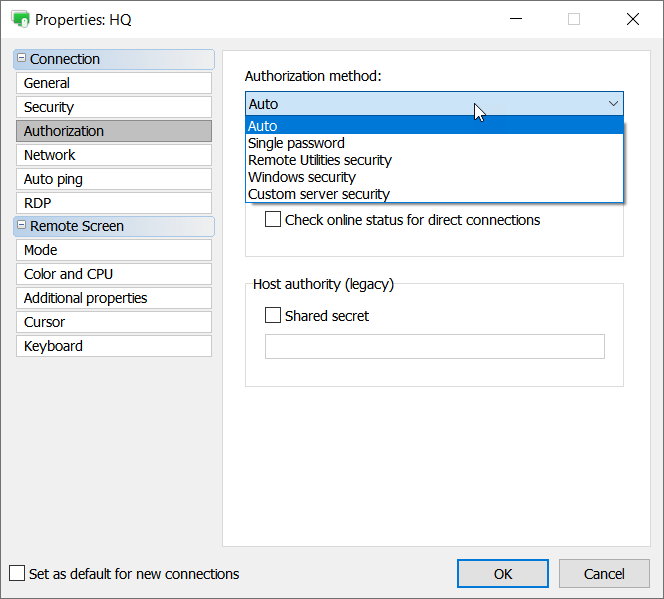
Looking forward to your reply.
Could you please check if you have either "Auto" or "Custom server security" (in fact I recommend you try both as part of the testing/troubleshooting process) value in the field below in connection properties for the Host in question:
Looking forward to your reply.
Passwords Paste in Windows 10 Logon Screen
Conrad Sallian,
Support (Posts: 3210)
Nov 25, 2019 3:17:17 am EST
Hello Bart,
Thank you for the contribution. We, in turn, will consider adding the functionality into Remote Utilities in the future.
Thank you for the contribution. We, in turn, will consider adding the functionality into Remote Utilities in the future.
Viewer unable to connect to remote hosts since moving to Virginmedia
Conrad Sallian,
Support (Posts: 3210)
Nov 25, 2019 3:11:55 am EST
Hello Paul,
Thank you for your message.
Am I right assuming that the issue is on the Viewer side? I.e. you changed ISP on the side where the Viewer is and your remote Hosts are not visible anymore?
Before looking further into the problem could you please flush your DNS cache on the Viewer computer just in case. You can use this command:
Thank you for your message.
Am I right assuming that the issue is on the Viewer side? I.e. you changed ISP on the side where the Viewer is and your remote Hosts are not visible anymore?
Before looking further into the problem could you please flush your DNS cache on the Viewer computer just in case. You can use this command:
ipconfig /flushdnsin the command line interface.