Conrad Sallian's community posts
Free license: Notification near the system tray and other changes

Conrad Sallian,
Support (Posts: 3210)
Jan 30, 2022 7:51:08 pm EST
This topic is about the recently added persistent notification (alert) near the system tray, as well as some other changes to how free/trial license works.
1. Persistent notification. This one is shown if you are connecting to a remote Host/Agent from a Viewer registered with a free license key or a Viewer in the trial mode.
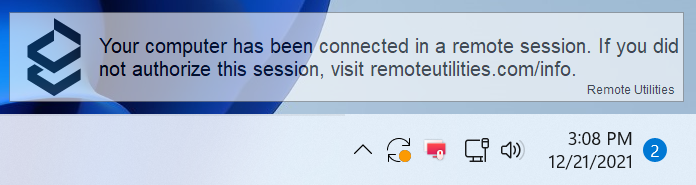
This message is NOT shown if you are connecting from a Viewer registered with a commercial license.
2. The 'Online' option in the MSI Configurator no longer works for free/trial users. That is, signing a custom Host or Agent package with our digital signature is now only available for paid customers.
3. Starting February 1, 2022 - just as we announced in our email newsletter sent to all free license users - we will stop the Internet-ID service for free license users of version 6.x.x.x. Please, upgrade to version 7 and generate a new free license key.
Paid license users - regardless of the version they use - are NOT affected.
--- Announcement as of January 30, 2022 ---
Based on the feedback we received with regards to #1, we decided that we'd modify the feature a bit:
- Windows 10 and later: the notification can be made visible for the remote side only, and invisible on the Viewer side. We are still investigating this option, but most likely it is possible to implement.
- Ability to pick the corner in which the notification will be shown.
- Translate the message to other languages
-------------------------------
Feel free to ask your questions and post your comments. This message will be updated with your frequently asked questions and our answers to them for everyone's convenience.
1. Persistent notification. This one is shown if you are connecting to a remote Host/Agent from a Viewer registered with a free license key or a Viewer in the trial mode.
This message is NOT shown if you are connecting from a Viewer registered with a commercial license.
2. The 'Online' option in the MSI Configurator no longer works for free/trial users. That is, signing a custom Host or Agent package with our digital signature is now only available for paid customers.
3. Starting February 1, 2022 - just as we announced in our email newsletter sent to all free license users - we will stop the Internet-ID service for free license users of version 6.x.x.x. Please, upgrade to version 7 and generate a new free license key.
Paid license users - regardless of the version they use - are NOT affected.
--- Announcement as of January 30, 2022 ---
Based on the feedback we received with regards to #1, we decided that we'd modify the feature a bit:
- Windows 10 and later: the notification can be made visible for the remote side only, and invisible on the Viewer side. We are still investigating this option, but most likely it is possible to implement.
- Ability to pick the corner in which the notification will be shown.
- Translate the message to other languages
-------------------------------
Feel free to ask your questions and post your comments. This message will be updated with your frequently asked questions and our answers to them for everyone's convenience.
Top toolbar missing on remote viewer
Conrad Sallian,
Support (Posts: 3210)
Jan 30, 2022 6:59:30 pm EST
Hi Graham,
Thank you for your message.
The toolbar will show up if you move your mouse cursor towards the top edge of the screen for 1-2 seconds. However, if it doesn't work still please let us know and we'll test it and see if we can reproduce it.
By the way, you can cycle through view modes (Windowed, Full Screen, Full screen stretch etc.) if you press F12 on your keyboard. Also, see other useful keyboard shortcuts.
Thank you for your message.
The toolbar will show up if you move your mouse cursor towards the top edge of the screen for 1-2 seconds. However, if it doesn't work still please let us know and we'll test it and see if we can reproduce it.
By the way, you can cycle through view modes (Windowed, Full Screen, Full screen stretch etc.) if you press F12 on your keyboard. Also, see other useful keyboard shortcuts.
Remove the notice near the system tray
Conrad Sallian,
Support (Posts: 3210)
Jan 30, 2022 6:35:05 pm EST
The user has been banned from the forum and the message was deleted for violating items 2 and 4 of our forum rules.
Please, keep the discussions civil.
Thank you.
Please, keep the discussions civil.
Thank you.
Cursor
Conrad Sallian,
Support (Posts: 3210)
Jan 30, 2022 3:09:38 pm EST
Hello,
Thank you for your message.
Cursor options are set individually for each connection (an item/entry in your address book that represents a remote PC).
In Viewer, right-click on the connection in question and select Properties. Go to "Cursor" and then select the appropriate option.
Hope that helps.
Thank you for your message.
Cursor options are set individually for each connection (an item/entry in your address book that represents a remote PC).
In Viewer, right-click on the connection in question and select Properties. Go to "Cursor" and then select the appropriate option.
Perhaps you have the rendering of remote cursor option selected. Try setting it to "View only mode active" or "Never" if you only want to see the local cursor.Every other PC I see my main cursor then another one inside the remote PC. It super laggy and the cursor changes based off what your hovering over.
Hope that helps.
Data Transfer Rate- very slow- is something wrong?
Conrad Sallian,
Support (Posts: 3210)
Jan 30, 2022 3:04:11 pm EST
Hello Douglas,
Please, note that Remote Utilities uses end-to-end encryption for any connection mode, including the File Transfer mode. This may decrease the transfer rate.
Please, note that Remote Utilities uses end-to-end encryption for any connection mode, including the File Transfer mode. This may decrease the transfer rate.
User status update
Conrad Sallian,
Support (Posts: 3210)
Jan 30, 2022 2:55:12 pm EST
Hi Werner,
On your account page you can add your license key. It will be recognised by the website and your support status will be set accordingly.
Hope that helps.
On your account page you can add your license key. It will be recognised by the website and your support status will be set accordingly.
Hope that helps.
Impossible to install host later than 7.0.0.3
Conrad Sallian,
Support (Posts: 3210)
Jan 30, 2022 2:53:49 pm EST
Hi Werner,
Thank you for your message.
Am I right assuming that you cannot update the remote Host using the 'Simple update' option and you can update it manually by running the Host installer on the Host machine?
Thank you for your message.
Am I right assuming that you cannot update the remote Host using the 'Simple update' option and you can update it manually by running the Host installer on the Host machine?
BitDefender - Problem with both Host and Agent
Conrad Sallian,
Support (Posts: 3210)
Jan 30, 2022 2:40:53 pm EST
Hello Lee,
We are sorry to hear that BitDefender is incapable of distinguishing legitimate software from malware and cannot even fix their false positive submission form. We can only hope that they don't make a "reverse" mistake and are still capable of detecting true viruses instead of treating them as benign programs.
Perhaps, you should consider looking at other antivirus software to protect your computers since no mistakes are allowed where security is involved.
We are sorry to hear that BitDefender is incapable of distinguishing legitimate software from malware and cannot even fix their false positive submission form. We can only hope that they don't make a "reverse" mistake and are still capable of detecting true viruses instead of treating them as benign programs.
Perhaps, you should consider looking at other antivirus software to protect your computers since no mistakes are allowed where security is involved.
Message on the remote screen
Conrad Sallian,
Support (Posts: 3210)
Jan 24, 2022 3:06:25 pm EST
Hi Christopher,
We have decided that in the next update we'll add an option to change the corner whether the message can be displayed. That all we can do to help.- Although translucent, they find it VERY annoying and pretty much can't see what's behind the message. They continually have to move the Visual Studio window out of the way and can't use it full screen anymore.
Please, make sure that you updated to the most recent version (Viewer and Host) , which is 7.1.2 as of this writing.- Even when I disconnect from them, the message STILL remains. They shut down RemoteUtilities and when they reopen it, the message just comes back.
We will hurt users even more if we let antivirus software go berserk on us because of the lack of such alerts.So, just to add, I understand that you're trying to prevent abuse by malware actors, but in doing so, you're hurting those of us who aren't (and I think those of us who aren't are the majority). Please consider this. I appreciate it.
Wake On LAN
Conrad Sallian,
Support (Posts: 3210)
Jan 24, 2022 8:15:50 am EST
Hi Patrick,
Are you able to establish direct connection via Remote Utilities at all? Is Host visible in your address book as a yellow Online icon before you log in to it?
Are you able to establish direct connection via Remote Utilities at all? Is Host visible in your address book as a yellow Online icon before you log in to it?