Pauline's community posts
Host to Host option

Hello Gerald,
Thank you for your message.
Both Host and Viewer can be installed and run on the same machine simultaneously since they don't affect each other, so you can log into any of your PCs and establish a remote connection to another one.
The Viewer is installed on the computer you use to connect to remote machines. The Viewer is wh ere you keep your address book or start a remote session. Learn more about the Viewer here: https://www.remoteutilities.com/support/docs/viewer/
The Host is installed on the remote PC to which you connect. Please note, that you must have administrative privileges on the computer in order to install the Host. Learn more about the Host here: https://www.remoteutilities.com/support/docs/host/
Please let us know if you have more questions.
Thank you for your message.
In order to establish a connection, you need to download and install Host and Viewer. Then you can connect fr om Viewer to Host. Here's a related guide on setting up a remote connection: https://www.remoteutilities.com/support/docs/quick-start-guide/#Internet-ID_connectionI want to be able to log into either PC and manage the other. How can I do this?
Both Host and Viewer can be installed and run on the same machine simultaneously since they don't affect each other, so you can log into any of your PCs and establish a remote connection to another one.
The Viewer is installed on the computer you use to connect to remote machines. The Viewer is wh ere you keep your address book or start a remote session. Learn more about the Viewer here: https://www.remoteutilities.com/support/docs/viewer/
The Host is installed on the remote PC to which you connect. Please note, that you must have administrative privileges on the computer in order to install the Host. Learn more about the Host here: https://www.remoteutilities.com/support/docs/host/
Please let us know if you have more questions.
File transfer error: cannot open directori
Changing host connection properties either locally or remotely?
Hello Rob,
Thank you for your message.
You can change the settings of a running remote Host from within the Viewer (i.e. remotely).
To do so, please follow these steps:
1. Right-click on the target connection in the Viewer and sel ect Remote Settings:
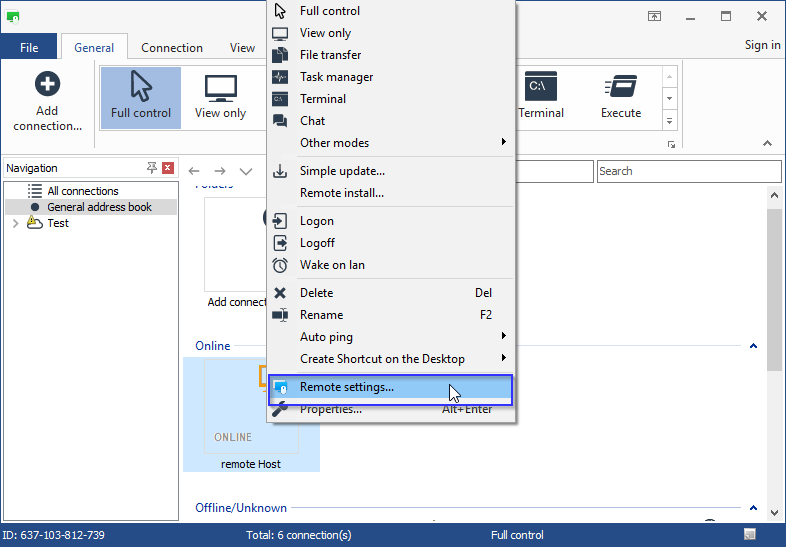
2. The Host configuration window will appear. Make all the desired changes to the Host settings and click OK. Please note, that if you are not logged on to the remote Host, an authorization prompt will appear.
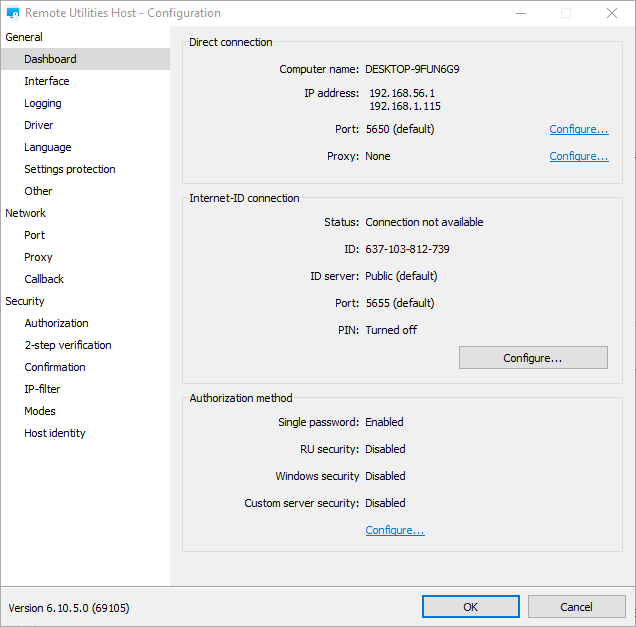
Also, please refer to this guide on the remote settings feature: https://www.remoteutilities.com/support/docs/remote-settings/
Please note, that after you change the password, your current session will keep running. Changes will be applied when you reconnect to the remote Host.
You can also invoke the Host configuration window fr om the Windows Start Menu on the Host machine:
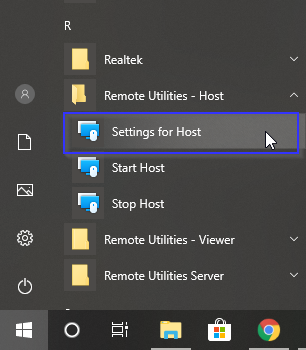
Please note, that if you have the settings protection feature enabled, the remote user needs to know the password to change the settings.
Hope that helps.
Thank you for your message.
You can change the settings of a running remote Host from within the Viewer (i.e. remotely).
To do so, please follow these steps:
1. Right-click on the target connection in the Viewer and sel ect Remote Settings:
2. The Host configuration window will appear. Make all the desired changes to the Host settings and click OK. Please note, that if you are not logged on to the remote Host, an authorization prompt will appear.
Also, please refer to this guide on the remote settings feature: https://www.remoteutilities.com/support/docs/remote-settings/
Please note, that after you change the password, your current session will keep running. Changes will be applied when you reconnect to the remote Host.
You can also invoke the Host configuration window fr om the Windows Start Menu on the Host machine:
Please note, that if you have the settings protection feature enabled, the remote user needs to know the password to change the settings.
Hope that helps.
Does RU support windows 10 S?
File transfer error: cannot open directori
Hello John,
Thank you for your message.
Please try switching to the "System" context in the Access menu in the File Transfer window as described here https://www.remoteutilities.com/support/docs/file-transfer/#access_menu and see if it resolves the issue.
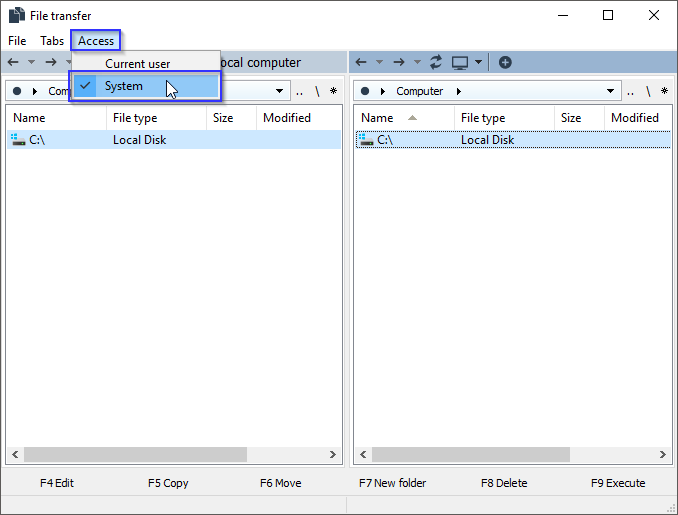
Please let me know if the problem persists.
Thank you for your message.
Please try switching to the "System" context in the Access menu in the File Transfer window as described here https://www.remoteutilities.com/support/docs/file-transfer/#access_menu and see if it resolves the issue.
Please let me know if the problem persists.
Sound Capture
Hello Jim,
Thank you for your message.
Unfortunately, there is no sound capture in the mobile version yet.
However, we are planning to implement this feature at some point in the future, but, unfortunately, I cannot give you any ETA.
Let me know if you have other questions.
Thank you for your message.
Unfortunately, there is no sound capture in the mobile version yet.
However, we are planning to implement this feature at some point in the future, but, unfortunately, I cannot give you any ETA.
Let me know if you have other questions.
Can't connect to hosts after update to host version
Can't connect to hosts after update to host version
FR: Linux, Mac - Host
Free License not adding
Hello Marlin,
Thank you for your message.
Could you please clarify if you don't receive an email with a free license key? Or if you do receive the email and nothing happens when you try to register the key in the License Key Storage?
Looking forward to your reply.
Thank you for your message.
Could you please clarify if you don't receive an email with a free license key? Or if you do receive the email and nothing happens when you try to register the key in the License Key Storage?
Looking forward to your reply.