Pauline's community posts
[Resolved] Constant Disconnecting

Agent Upgrade changes Internet ID
Hello Dennis,
Thank you for your message.
We are currently working on Viewer for Mac. Host and Agent will be made available some time later after that. For more information please, refer to this forum thread.
Let us know if you have more questions.
Thank you for your message.
We are currently working on Viewer for Mac. Host and Agent will be made available some time later after that. For more information please, refer to this forum thread.
Let us know if you have more questions.
Remote View Event Viewer
Hello Nijel,
Thank you for your message.
Let us know if you have more questions.
Thank you for your message.
As we mentioned above, we plan to implement this feature in our future updates.This would be great if event viewer could be added just like this without needing to log in & disturb the screen.
Let us know if you have more questions.
From my viewer how can I get host LAN IP address
Hello Rob,
Thank you for your message.
Unfortunately, if the Internet-ID connection is used, the LAN IP address won't be shown, but we plan to implement such feature in the future.
Also, if there is a VPN connection between Viewer and Host you can connect directly using the VPN IP address of the remote Host.
Hope that helps.
Thank you for your message.
Unfortunately, if the Internet-ID connection is used, the LAN IP address won't be shown, but we plan to implement such feature in the future.
Also, if there is a VPN connection between Viewer and Host you can connect directly using the VPN IP address of the remote Host.
Hope that helps.
From my viewer how can I get host LAN IP address
Hello Rob,
Thank you for clarifying.
Please try switching to the Details view style on the View tab in the main Viewer window. There's an IP address field displayed where you can see the Host's IP address if the direct connection was established:
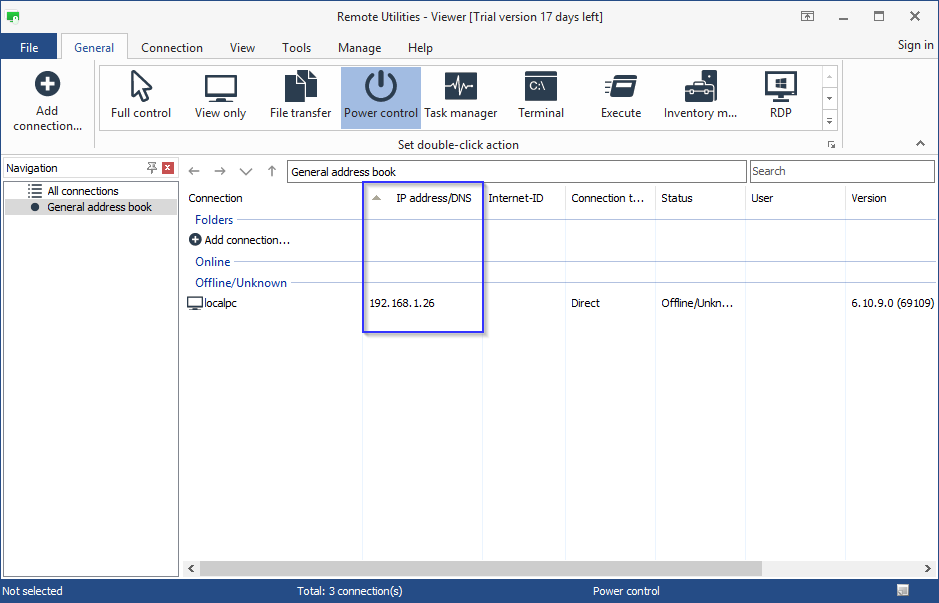
If you connected to the Host using an Internet-ID connection, the Internet-ID Server address will be shown, whether public server or self-hosted server is used.
We plan to implement a feature which shows an IP address of the Host even if the Internet-ID connection is used in the future.
Let us know if you have more questions.
Thank you for clarifying.
Please try switching to the Details view style on the View tab in the main Viewer window. There's an IP address field displayed where you can see the Host's IP address if the direct connection was established:
If you connected to the Host using an Internet-ID connection, the Internet-ID Server address will be shown, whether public server or self-hosted server is used.
We plan to implement a feature which shows an IP address of the Host even if the Internet-ID connection is used in the future.
Let us know if you have more questions.
From my viewer how can I get host LAN IP address
Hello Rob,
Thank you for your message.
To determine the private (local) IP address of the Host computer hover your mouse pointer over the Host icon in the system tray. The tooltip will show your local IP address:
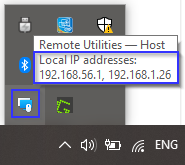
Here's a Documentation article on connecting over LAN that might be helpful: https://www.remoteutilities.com/support/docs/connecting-over-lan/
Hope that helps.
Thank you for your message.
To determine the private (local) IP address of the Host computer hover your mouse pointer over the Host icon in the system tray. The tooltip will show your local IP address:
Here's a Documentation article on connecting over LAN that might be helpful: https://www.remoteutilities.com/support/docs/connecting-over-lan/
Hope that helps.
Simple update
Agent Upgrade changes Internet ID
Hello,
Thank you for your clarifying.
If you build a custom Agent using the MSI Configurator, your custom Agent settings will overwrite all the traces of the previous Agent.
The vanilla Agent is available for download here.
Hope that helps.
Thank you for your clarifying.
Please try downloading and running a vanilla Agent - this way the settings from your custom Agent will be picked up when running a newly downloaded vanilla Agent.I built a custom Agent package with MSI Configurator and I don't use public RU server
If you build a custom Agent using the MSI Configurator, your custom Agent settings will overwrite all the traces of the previous Agent.
The vanilla Agent is available for download here.
Hope that helps.
Agent Upgrade changes Internet ID
Hello,
Thank you for your message.
Could you please clarify, how did you upd ate the Agent? Did you download the vanilla Agent or build a custom Agent package using the MSI Configurator?
If you built a custom Agent, then could you please clarify what settings did you se t at Step 3 of the configuration? Please double check, that the Generate a new Internet-ID code wasn't selected.
A screenshot of the Internet-ID tab of the configurator would be helpful.
Please let us know if the problem persists.
Thank you for your message.
Could you please clarify, how did you upd ate the Agent? Did you download the vanilla Agent or build a custom Agent package using the MSI Configurator?
If you built a custom Agent, then could you please clarify what settings did you se t at Step 3 of the configuration? Please double check, that the Generate a new Internet-ID code wasn't selected.
A screenshot of the Internet-ID tab of the configurator would be helpful.
Please let us know if the problem persists.
I can not connect to the host
Hello Rafael,
Thank you for your message.
Could you please clarify what type of connection do you use? If your Host and the Viewer are on the same LAN or VPN and you use a direct connection, please refer to this troubleshooting guide: https://www.remoteutilities.com/support/kb/cannot-connect-using-direct-connection/
If you use an Internet-ID connection, solutions listed in this article might be helpful: https://www.remoteutilities.com/support/kb/cannot-connect-using-internet-id-connection/
Also, please make sure that Viewer and Host/Agent are up to date and the same versions. Please note, that version mismatch between Viewer and Host/Agent may lead to performance issues and some features not working. Also, if you use the self-hosted server (RU Server) update it to the most recent version too.
The latest version is 6.10.9.0 and it's available for download here.
Hope that helps.
Thank you for your message.
Could you please clarify what type of connection do you use? If your Host and the Viewer are on the same LAN or VPN and you use a direct connection, please refer to this troubleshooting guide: https://www.remoteutilities.com/support/kb/cannot-connect-using-direct-connection/
If you use an Internet-ID connection, solutions listed in this article might be helpful: https://www.remoteutilities.com/support/kb/cannot-connect-using-internet-id-connection/
Also, please make sure that Viewer and Host/Agent are up to date and the same versions. Please note, that version mismatch between Viewer and Host/Agent may lead to performance issues and some features not working. Also, if you use the self-hosted server (RU Server) update it to the most recent version too.
The latest version is 6.10.9.0 and it's available for download here.
Hope that helps.