Pauline's community posts
Problems with Internet-ID connection using default server

Hello Aleksandr,
Thank you for the clarification.
Could you please also clarify if you are able to connect to another Host from this Viewer? If the same issue occurs when connecting to another Host, it might mean that the Viewer configuration file was somehow corrupted or deleted.
If this is the case, please, try the following:
1. Fully exit the Viewer (File -> Exit).
2. Locate the file config_4.xml in the Remote Utilities Viewer %appdata% folder.
3. Remove the config_4.xml file from that folder.
This will reset the Viewer settings/options. Your address books won't be affected by this action.
Please let me know if the issue persists.
Thank you for the clarification.
Could you please also clarify if you are able to connect to another Host from this Viewer? If the same issue occurs when connecting to another Host, it might mean that the Viewer configuration file was somehow corrupted or deleted.
If this is the case, please, try the following:
1. Fully exit the Viewer (File -> Exit).
2. Locate the file config_4.xml in the Remote Utilities Viewer %appdata% folder.
3. Remove the config_4.xml file from that folder.
This will reset the Viewer settings/options. Your address books won't be affected by this action.
Please let me know if the issue persists.
How to reduce the host size?
Problems with Internet-ID connection using default server
Hello Aleksandr,
Thank you for your message.
Please try referring to this Knowledge Base article: https://www.remoteutilities.com/support/kb/socket-error-11001-host-not-found/
Hope that helps.
Thank you for your message.
Please try referring to this Knowledge Base article: https://www.remoteutilities.com/support/kb/socket-error-11001-host-not-found/
Hope that helps.
How to reduce the host size?
Hello,
Thank you for your message.
Could you please clarify if you mean that you get 17 MB installation files using the MSI configurator tool? If this is the case, did you consider using the Agent package instead? Its size is only about 12 MB.
Hope that helps.
Thank you for your message.
Could you please clarify if you mean that you get 17 MB installation files using the MSI configurator tool? If this is the case, did you consider using the Agent package instead? Its size is only about 12 MB.
Hope that helps.
How to install portble viewer
How to install portble viewer
Hello Paul,
Thank you for your message.
Portable Viewer stores all files in a single folder that you can copy onto the portable drive.
Here is a related Documentation article that might be helpful: https://www.remoteutilities.com/support/docs/portable-viewer/
Let me know if you have more questions.
Thank you for your message.
Portable Viewer doesn't require installation. If you already downloaded the Portable Viewer to your drive, then you can start working with it right away.But I did not find anything about installing on a portable drive.
Portable Viewer stores all files in a single folder that you can copy onto the portable drive.
Here is a related Documentation article that might be helpful: https://www.remoteutilities.com/support/docs/portable-viewer/
Let me know if you have more questions.
Viewer Won't Load Connection
Hello Tanner,
I'm glad to hear it worked for you!
Let me know if you have more questions.
I'm glad to hear it worked for you!
It means that the config_4.xml file was corrupted and it was causing the issue. I highly recommend that you add the Viewer installation folder and the %appdata%\Remote Utilities Files\ folder to antivirus software exceptions list to avoid future problems in this regard.Also, I have the viewer on other machines that work on the normal viewer fine.
Let me know if you have more questions.
Viewer Won't Load Connection
Hello Tanner,
Thank you for your message.
The yellow monitor displayed on the connection icon means that the remote Host is accessible, but you are not logged on it yet.
If this is the case, the issue might have occurred if the Viewer configuration file (config_4.xml) somehow was corrupted or deleted. Please, try deleting the config_4.xml file which you may find in the %appdata%\Remote Utilities Files\ folder. This will reset the Viewer settings/options. Your address books won't be affected by this action.
Let me know if the issue persists.
Thank you for your message.
The yellow monitor displayed on the connection icon means that the remote Host is accessible, but you are not logged on it yet.
Could you please clarify if you connect to the same Hosts using the same credentials and connection types? Also, please clarify if you launch the portable Viewer on the same machine as the Viewer that the issue occurred in?FWIW, the portable viewer does work, so I'v been using that in the mean time.
If this is the case, the issue might have occurred if the Viewer configuration file (config_4.xml) somehow was corrupted or deleted. Please, try deleting the config_4.xml file which you may find in the %appdata%\Remote Utilities Files\ folder. This will reset the Viewer settings/options. Your address books won't be affected by this action.
Let me know if the issue persists.
copy/paste multiple connexion
Hello Luc.
Unfortunately, we couldn't reproduce the issue.
Could you please clarify if you tried the set clipboard command? It's located in the additional commands menu of the toolbar, in the Full Control window. Here's a related guide that might be helpful: https://www.remoteutilities.com/support/docs/full-control-and-view/#Additional_commands
Hope that helps.
Unfortunately, we couldn't reproduce the issue.
Could you please clarify if you tried the set clipboard command? It's located in the additional commands menu of the toolbar, in the Full Control window. Here's a related guide that might be helpful: https://www.remoteutilities.com/support/docs/full-control-and-view/#Additional_commands
Hope that helps.
Hide the white box at top center
Hello Basil,
Thank you for your message.
Could you please clarify if you mean the toolbar in the Full Control mode window? If this is the case, please make sure, you have the Pin button on the toolbar deselected:
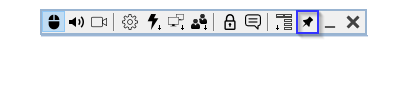
This way, the toolbar is only visible when you hover the mouse pointer over the top edge of the Full Control window.
Hope that helps.
Thank you for your message.
Could you please clarify if you mean the toolbar in the Full Control mode window? If this is the case, please make sure, you have the Pin button on the toolbar deselected:
This way, the toolbar is only visible when you hover the mouse pointer over the top edge of the Full Control window.
Hope that helps.