Pauline's community posts
mac os viewer and agent

Hello Giuseppe,
Thank you for your message.
Of course, Agent and Viewer for Mac are already in development. The release of Agent/Host for Mac will follow the Viewer for Mac which we hope to release by the end of the year. Unfortunately, we cannot provide any specific ETA yet.
Please let me know if you have more questions.
Thank you for your message.
Of course, Agent and Viewer for Mac are already in development. The release of Agent/Host for Mac will follow the Viewer for Mac which we hope to release by the end of the year. Unfortunately, we cannot provide any specific ETA yet.
Please let me know if you have more questions.
Can't find/control mouse cursor on Android
Hello Mark,
Thank you for your message.
Could you please clarify if there is no remote desktop cursor displayed when you connect to a remote Host via the Android Viewer app?
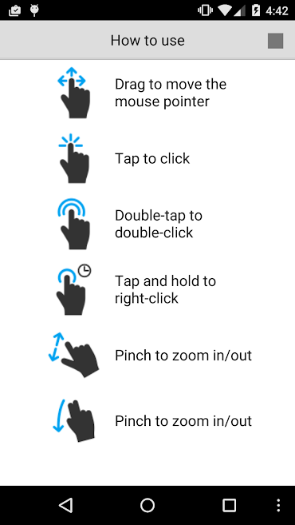
If there is a remote desktop cursor visible, then you should be able to control it by using these gestures:
Looking forward to your reply.
Thank you for your message.
Could you please clarify if there is no remote desktop cursor displayed when you connect to a remote Host via the Android Viewer app?
If there is a remote desktop cursor visible, then you should be able to control it by using these gestures:
Looking forward to your reply.
Windows server 2016 connects once
Hello Dan,
Thank you for your message.
Before we proceed to further troubleshooting, please try referring to this troubleshooting guide for the Internet-ID connection and see if any solution among the ones that are listed in the article helps to resolve the issue.
If you have tried all solutions but the issue still persists, please send us the Host log files for examination. Here is how to locate the Host logs: https://www.remoteutilities.com/support/docs/host-log/
You can send them to support@remote-utilities.com
Please, do not publish the logs on the forum, they are considered personal information.
Looking forward to your reply.
Thank you for your message.
Before we proceed to further troubleshooting, please try referring to this troubleshooting guide for the Internet-ID connection and see if any solution among the ones that are listed in the article helps to resolve the issue.
If you have tried all solutions but the issue still persists, please send us the Host log files for examination. Here is how to locate the Host logs: https://www.remoteutilities.com/support/docs/host-log/
You can send them to support@remote-utilities.com
Please, do not publish the logs on the forum, they are considered personal information.
Looking forward to your reply.
Remote Uninstallation
Hello Nathan,
Thank you for your patience.
I checked with our developers on the feature. We do not plan to implement it as a separate feature or a connection method, but, perhaps, it will be a part of some new modules in our future updates.
Let me know if you have more questions.
Thank you for your patience.
I checked with our developers on the feature. We do not plan to implement it as a separate feature or a connection method, but, perhaps, it will be a part of some new modules in our future updates.
Let me know if you have more questions.
Chat to front screen.
Hello Nathan,
Thank you for your message.
The Send message connection method works in a similar way. It allows you to send a plain text message to a remote Host machine and the message is immediately displayed on the remote computer's screen. This way, you can also broadcast a message to multiple computers. For more information on the Send message connection method, please refer to this Documentation page.
Alternatively, while in the Full Control and View connection mode, hover your mouse over the top edge of the screen to reveal to toolbar and click on the Text chat icon.

This will enable the mini-chat panel and also open the mini-chat window on the remote Host machine.
Hope that helps.
Thank you for your message.
The Send message connection method works in a similar way. It allows you to send a plain text message to a remote Host machine and the message is immediately displayed on the remote computer's screen. This way, you can also broadcast a message to multiple computers. For more information on the Send message connection method, please refer to this Documentation page.
Alternatively, while in the Full Control and View connection mode, hover your mouse over the top edge of the screen to reveal to toolbar and click on the Text chat icon.
This will enable the mini-chat panel and also open the mini-chat window on the remote Host machine.
Hope that helps.
Remote Uninstallation
Hello Nathan,
Thank you for the clarification.
I will forward your feature suggestion to our developers for review to see if it can be added to our roadmap.
As for the PowerShell commands feature - we certainly have this feature on our roadmap but haven't implemented it yet.
Please let me know if you have more questions.
Thank you for the clarification.
I will forward your feature suggestion to our developers for review to see if it can be added to our roadmap.
As for the PowerShell commands feature - we certainly have this feature on our roadmap but haven't implemented it yet.
Please let me know if you have more questions.
Remote Uninstallation
Hello Nathan,
Thank you for your message.
Could you please clarify if you mean uninstalling Host remotely? If this is the case, there is already such a feature within the Remote Install Tool. In order to uninstall the Host remotely, please do the following:
1. Run the Viewer as administrator.
2. In the Viewer address book select a connection (or a few connections).
3. Navigate to the Tools tab on the toolbar and click Remote Install...
4. Select a connection type and in the Action menu choose Uninstall host and click Process action.
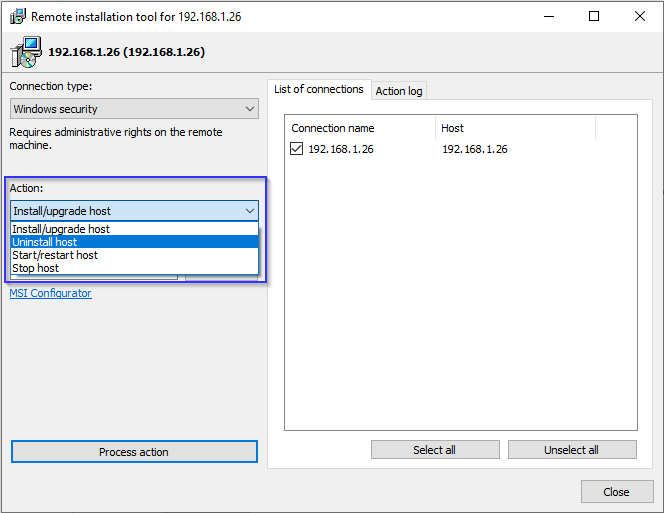
For more information please refer to this Documentation article.
If you mean something else, please elaborate a bit more on the feature.
Hope that helps.
Thank you for your message.
Could you please clarify if you mean uninstalling Host remotely? If this is the case, there is already such a feature within the Remote Install Tool. In order to uninstall the Host remotely, please do the following:
1. Run the Viewer as administrator.
2. In the Viewer address book select a connection (or a few connections).
3. Navigate to the Tools tab on the toolbar and click Remote Install...
4. Select a connection type and in the Action menu choose Uninstall host and click Process action.
For more information please refer to this Documentation article.
If you mean something else, please elaborate a bit more on the feature.
Hope that helps.
Internet-ID server logs
Can not connect to windows 2008 r2 server
Hello Wayne,
Thank you for your message.
Please try referring to this troubleshooting article before we proceed to further troubleshoot.
If you have tried all the solutions that are listed in the article above and the issue still persists, please send us the Host logs from the Windows 2008 r2 server machine for examination. Here's how to locate the Host log files: https://www.remoteutilities.com/support/docs/host-log/
You can send the log files to support@remoteutilities.com. Please do not publish your logs on the forum as they are considered personal information.
Looking forward to your reply.
Thank you for your message.
Please try referring to this troubleshooting article before we proceed to further troubleshoot.
If you have tried all the solutions that are listed in the article above and the issue still persists, please send us the Host logs from the Windows 2008 r2 server machine for examination. Here's how to locate the Host log files: https://www.remoteutilities.com/support/docs/host-log/
You can send the log files to support@remoteutilities.com. Please do not publish your logs on the forum as they are considered personal information.
Looking forward to your reply.
host blocked
Hello Rafael,
Thank you for your message.
Could you please clarify if you mean that you've updated your remote Hosts to the latest versions (6.10.10.0 as of this writing) and after you've performed the update, it's no longer possible to connect to these remote Hosts? If this is the case, please try referring to these troubleshooting articles before we proceed to further troubleshoot, as one of the solutions listed there might help in resolving the issue.
Refer to this article if you're using the Direct connection method: https://www.remoteutilities.com/support/kb/cannot-connect-using-direct-connection/
Refer to this one, if you're using the Internet-ID connection method: https://www.remoteutilities.com/support/kb/cannot-connect-using-internet-id-connection/
Please let me know if you've tried all the solutions and the issue still persists.
Thank you for your message.
Could you please clarify if you mean that you've updated your remote Hosts to the latest versions (6.10.10.0 as of this writing) and after you've performed the update, it's no longer possible to connect to these remote Hosts? If this is the case, please try referring to these troubleshooting articles before we proceed to further troubleshoot, as one of the solutions listed there might help in resolving the issue.
Refer to this article if you're using the Direct connection method: https://www.remoteutilities.com/support/kb/cannot-connect-using-direct-connection/
Refer to this one, if you're using the Internet-ID connection method: https://www.remoteutilities.com/support/kb/cannot-connect-using-internet-id-connection/
Please let me know if you've tried all the solutions and the issue still persists.