Pauline's community posts
Free License not adding

Free License not adding
Hello Jonathan,
Thank you for your message.
Perhaps, the Viewer configuration file was somehow corrupted by some antivirus or firewall software after the installation.
Please, try the following:
1. Fully exit the Viewer File -> Exit.
2. Locate the file config_4.xml in the C:\Users\[Your_username]\AppData\Roaming\Remote Utilities Files\ folder.
Please note that the AppData folder might be hidden by default in which case you need to enable "Hidden files and folders" in Windows Explorer settings.
3. Remove the config_4.xml file from that folder.
This will reset the Viewer settings. Your address books won't be affected by this action.
4. Run the Viewer and try registering it with your license key again.
Please let me know if the issue persists.
Thank you for your message.
Perhaps, the Viewer configuration file was somehow corrupted by some antivirus or firewall software after the installation.
Please, try the following:
1. Fully exit the Viewer File -> Exit.
2. Locate the file config_4.xml in the C:\Users\[Your_username]\AppData\Roaming\Remote Utilities Files\ folder.
Please note that the AppData folder might be hidden by default in which case you need to enable "Hidden files and folders" in Windows Explorer settings.
3. Remove the config_4.xml file from that folder.
This will reset the Viewer settings. Your address books won't be affected by this action.
4. Run the Viewer and try registering it with your license key again.
Please let me know if the issue persists.
Delay on UAC pop up
Hello Ricardo,
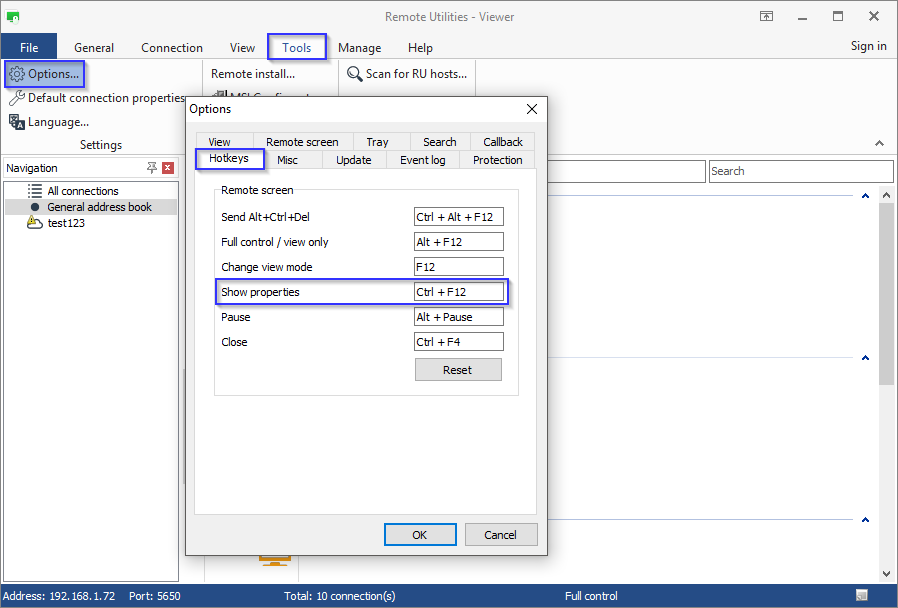
1. In Viewer window navigate to the tab Tools -> Options.
2. In the Options window switch to the Hotkeys tab.
3. Specify a custom hotkey:
I also checked with our developers on the UAC issue. Unfortunately, the delay you're encountering is expected behavior, as there are some specific factors of why the delay is required. We will try to reduce the delay in our future updates, but we cannot provide you any specific ETA yet.
I am sorry if this makes the program less useful for you.
You can also invoke the Connection properties window by using hotkeys Ctrl+F12. Or you can customize the hotkey combination:Is there a quick way to lock/unlock Host input?
1. In Viewer window navigate to the tab Tools -> Options.
2. In the Options window switch to the Hotkeys tab.
3. Specify a custom hotkey:
I also checked with our developers on the UAC issue. Unfortunately, the delay you're encountering is expected behavior, as there are some specific factors of why the delay is required. We will try to reduce the delay in our future updates, but we cannot provide you any specific ETA yet.
I am sorry if this makes the program less useful for you.
Delay on UAC pop up
Hello Ricardo,
Thank you for your patience.
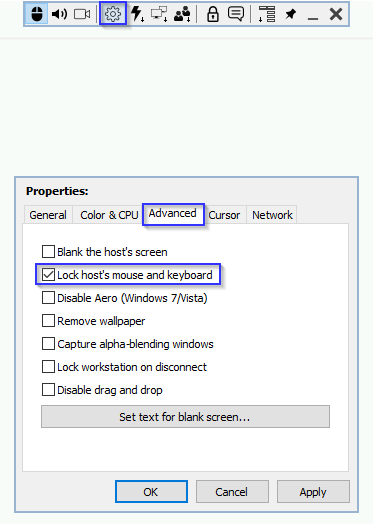
You can also lock the Host's input while the connection to the remote machine is active. Select Connection properties icon on the toolbar and navigate to the Advanced tab. Select the required checkbox:
I'll get back to you soon with more information regarding the UAC issue.
Thank you for your patience.
Yes, we have managed to reproduce the issue. I forwarded it to our developers and asked for their input.Any update on this?...
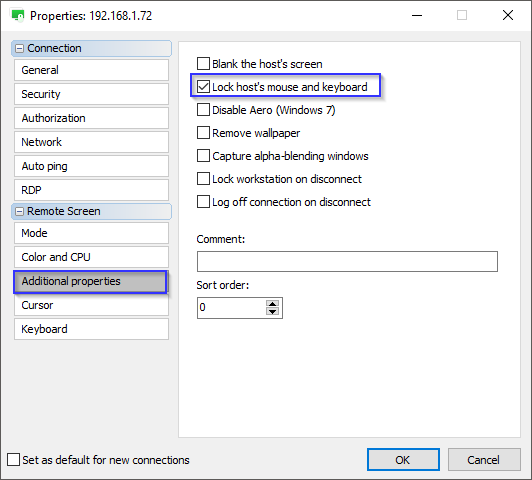
Of course. To lock the Host's input, open the Connection properties menu and navigate to the tab Additional properties. Tick the Lock host's mouse and keyboard checkbox:Is there a way to lock the host input (mouse/keyboard) without blanking the screen??
You can also lock the Host's input while the connection to the remote machine is active. Select Connection properties icon on the toolbar and navigate to the Advanced tab. Select the required checkbox:
I'll get back to you soon with more information regarding the UAC issue.
Offline Connections When Viewer is Using LAN/Cable Internet
Hello,
Thank you for the provided log file.
We have examined your log file and it seems like there's something in your network blocking the connection to our servers. You might have certain outbound ports blocked on the corporate firewall level. You need to make sure they are opened and that our ID server is accessible. Here's a related Documentation article that might be helpful: https://www.remoteutilities.com/support/docs/ports-used-by-remote-utilities/#public
Please contact your network administrator regarding the issue.
Hope that helps.
Thank you for the provided log file.
We have examined your log file and it seems like there's something in your network blocking the connection to our servers. You might have certain outbound ports blocked on the corporate firewall level. You need to make sure they are opened and that our ID server is accessible. Here's a related Documentation article that might be helpful: https://www.remoteutilities.com/support/docs/ports-used-by-remote-utilities/#public
Please contact your network administrator regarding the issue.
Hope that helps.
Offline Connections When Viewer is Using LAN/Cable Internet
Hello,
Thank you for your message.
It looks like our ID server might be blocked/not while-listed in your corporate network. Could you please send us the Host logs for examination? Here is how to locate the Host logs: https://www.remoteutilities.com/support/docs/host-log/
You can send them to support@remote-utilities.com.
Looking forward to your reply.
Thank you for your message.
It looks like our ID server might be blocked/not while-listed in your corporate network. Could you please send us the Host logs for examination? Here is how to locate the Host logs: https://www.remoteutilities.com/support/docs/host-log/
You can send them to support@remote-utilities.com.
Looking forward to your reply.
What a great piece of Software!!
host email with attachment
Hello Ginger,
Thank you for your message.
Could you please clarify if I'm right in assuming that you're connecting to the remote Host PC from the Viewer on your computer?
Also, please clarify what email client is used when the issue occurs?
When the connection type is determined, please try referring to this troubleshooting guides:
1. This one if the direct connection is used.
2. This one if the Internet-ID connection is used.
If you have tried all the solutions listed in the related troubleshooting guide, but the issue still persists, please let me know, so we can continue to further troubleshoot the issue.
Looking forward to your reply.
Thank you for your message.
Could you please clarify if I'm right in assuming that you're connecting to the remote Host PC from the Viewer on your computer?
Also, please clarify what email client is used when the issue occurs?
Could you please also clarify what type of connection is used to establish a connection to the remote machine - a direct connection or an Internet-ID connection?It says Unable to connect - and it tries 5 times.
When the connection type is determined, please try referring to this troubleshooting guides:
1. This one if the direct connection is used.
2. This one if the Internet-ID connection is used.
If you have tried all the solutions listed in the related troubleshooting guide, but the issue still persists, please let me know, so we can continue to further troubleshoot the issue.
Looking forward to your reply.