Conrad Sallian's community posts
Portable Viewer flagged as Trojan: Win32/Rundas!plock

Hello Bart,
This detection was strange from the very beginning. For example, when we tested it yesterday Windows Defender falsely notified as about this "trojan" but still allowed Viewer to run. Then why they call the Viewer a trojan in the first place? :)
Anyway, we have already received a response from Microsoft and they asked some more information. We'll make sure that this issue is resolved soon.
Thanks.
This detection was strange from the very beginning. For example, when we tested it yesterday Windows Defender falsely notified as about this "trojan" but still allowed Viewer to run. Then why they call the Viewer a trojan in the first place? :)
Anyway, we have already received a response from Microsoft and they asked some more information. We'll make sure that this issue is resolved soon.
Thanks.
Portable Viewer flagged as Trojan: Win32/Rundas!plock
Hello Bart,
Thank you for your message. Yes, this problem was also reported today by a few other users as well. We have already contacted Microsoft regarding this issue. Hopefully, they will fix it as soon as possible.
I perfectly understand your frustration because we are frustrated with these uncontrolled and irresponsible antivirus software behaviors too.
P.S. I will move this thread to the antivirus sub -forum.
Thank you for your message. Yes, this problem was also reported today by a few other users as well. We have already contacted Microsoft regarding this issue. Hopefully, they will fix it as soon as possible.
I perfectly understand your frustration because we are frustrated with these uncontrolled and irresponsible antivirus software behaviors too.
P.S. I will move this thread to the antivirus sub -forum.
Set up not to show domain name and machine name on Host's (Agent's) desktop
Applying license key on admin but can not automatic on users
Hello Phann,
Ok, I understand. To avoid unnecessary duplication, I will provide links to respective sections of our website:
Product benefits
Features
Security
Self-hosted server
As for fastness and easiness to use - our users judge about that, not us. Unlike some of our competitors we do not shout from the rooftops about how great we are :) We just do our job.
Among the current disadvantages are the lack of Mac OSX Support and full-fledged address book in the mobile client. We hope this year we'll implement both of these.
Hope that helps.
Ok, I understand. To avoid unnecessary duplication, I will provide links to respective sections of our website:
Product benefits
Features
Security
Self-hosted server
As for fastness and easiness to use - our users judge about that, not us. Unlike some of our competitors we do not shout from the rooftops about how great we are :) We just do our job.
Among the current disadvantages are the lack of Mac OSX Support and full-fledged address book in the mobile client. We hope this year we'll implement both of these.
Hope that helps.
Applying license key on admin but can not automatic on users
Hello Phann,
You are welcome :)
Looking forward to your reply.
You are welcome :)
This might be a very broad question. What is it specifically that you want to achieve with Remote Utilities? In other words, how exactly you want to use it, for what purpose or task?Could you tell me what is pros and corns of RemoteUtilities?
Looking forward to your reply.
Question about 10 PC limit for free license
Having 3 same internet id in 10 connections
Hi
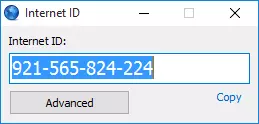
Are you sure you have indeed the same IDs on those Hosts? Could you please verify it by right-clicking the Host icon in the system tray and selecting "Internet ID connection settings". The ID will be displayed in a window like this:
If you installed them manually on three different physical machines and generated the Internet ID in the Host settings it is next to impossible that there are duplicate IDs on even two Hosts, much less three or more :)No, I didnt clone them, I installed them manually on each computers.
Are you sure you have indeed the same IDs on those Hosts? Could you please verify it by right-clicking the Host icon in the system tray and selecting "Internet ID connection settings". The ID will be displayed in a window like this:
We are planning to release it in a week or two.When is the next version going to be released?
Having 3 same internet id in 10 connections
Why do the hosts randomly lose the remote internet ID?
Hello Brian,
I would recommend the following:
1. Check that you have the most recent version of both Viewer and Host. This should be 6.5.0.8 as of this writing. There used to be issues with previous versions and Windows update, as described in this article.
2. If there is antivirus software on the Host computer, make sure you add the Host installation path to its exception list. This is recommended even if you don't have issues with this a/v software so far - you never know when they decide to block or restrict the software next time. A/V programs don't like remote controls much and often mark such programs as riskware.
Specifically about Symantec - there were couple of issues with them recently and each time we reported to Symantec. The last time they responded that the issue was fixed. But if you still have issues with Host settings erased or reset - and this is a sure sign of either a/v activity or Windows update activity - then let us know.
Thanks.
I would recommend the following:
1. Check that you have the most recent version of both Viewer and Host. This should be 6.5.0.8 as of this writing. There used to be issues with previous versions and Windows update, as described in this article.
2. If there is antivirus software on the Host computer, make sure you add the Host installation path to its exception list. This is recommended even if you don't have issues with this a/v software so far - you never know when they decide to block or restrict the software next time. A/V programs don't like remote controls much and often mark such programs as riskware.
Specifically about Symantec - there were couple of issues with them recently and each time we reported to Symantec. The last time they responded that the issue was fixed. But if you still have issues with Host settings erased or reset - and this is a sure sign of either a/v activity or Windows update activity - then let us know.
Thanks.