Conrad Sallian's community posts
Invite guest to work on 3rd party computer

Conrad Sallian,
Support (Posts: 3210)
Oct 21, 2024 3:29:49 pm EDT
Hello,
This can be done using the portable Viewer, which saves all its settings in the same folder as the main program executable (rutview.exe). Here's how to set it up:
1. Download the portable Viewer and unzip it.
2. Run rutview.exe from the folder.
3. Add your Host(s) to the address book. Depending on the authentication method used, you can choose to save the access password (single password or RU security login/password) in Connection properties -> Security (right-click on the host in the address book to access this).
4. (Optional) You can safely delete the 'assets' folder if the end user doesn’t need to use the MSI Configurator in the Viewer. This folder contains Host files, which may trigger some antivirus software.
You can distribute the folder in several ways, such as via a shared folder or a zip file for download. In this case, the user only needs to unzip the folder, run the Viewer, and initiate the connection from the address book.
To simplify it even further, you can create a connection shortcut and place it at the same level as the portable Viewer folder. This way, the user can start the remote session in the desired connection mode by simply clicking the shortcut, without needing to navigate inside the folder.
Hope this helps!
This can be done using the portable Viewer, which saves all its settings in the same folder as the main program executable (rutview.exe). Here's how to set it up:
1. Download the portable Viewer and unzip it.
2. Run rutview.exe from the folder.
3. Add your Host(s) to the address book. Depending on the authentication method used, you can choose to save the access password (single password or RU security login/password) in Connection properties -> Security (right-click on the host in the address book to access this).
4. (Optional) You can safely delete the 'assets' folder if the end user doesn’t need to use the MSI Configurator in the Viewer. This folder contains Host files, which may trigger some antivirus software.
You can distribute the folder in several ways, such as via a shared folder or a zip file for download. In this case, the user only needs to unzip the folder, run the Viewer, and initiate the connection from the address book.
To simplify it even further, you can create a connection shortcut and place it at the same level as the portable Viewer folder. This way, the user can start the remote session in the desired connection mode by simply clicking the shortcut, without needing to navigate inside the folder.
Hope this helps!
[Resolved] Unable to open a ticket with paid license and Adv in 7.6 detected
Conrad Sallian,
Support (Posts: 3210)
Oct 21, 2024 10:13:40 am EDT
Hi Aleur,
With regards to the first issue - we fixed the form on the website/account. Please, try adding your license now and raising the support level.
Thanks.
With regards to the first issue - we fixed the form on the website/account. Please, try adding your license now and raising the support level.
Thanks.
[Resolved] Unable to open a ticket with paid license and Adv in 7.6 detected
Conrad Sallian,
Support (Posts: 3210)
Oct 21, 2024 8:35:45 am EDT
Hello Aleur,
Regarding your tickets—we’ll check the website and get back to you. Our site recently went through a facelift, so minor issues are possible. Apologies for any inconvenience.
Unfortunately, antivirus software has become completely unreliable ever since many companies, even those with a good track record (i.e., old-school AV vendors), started using AI technologies to save on manpower and development costs. The number of mistakes and false positives—especially those that make no sense, like in this case—is beyond comprehension.
You can submit a false positive report to Microsoft, and they will fix it (just as Norton did in this thread) and apologize. But when the next version of Remote Utilities is released, signed with the same certificate, it will happen all over again.
This is how the 'antivirus software industry' works today, and frankly, we feel sorry for them. Their ultimate goal isn’t to protect you against viruses—it’s to create the illusion of protection. They want to show that they’re 'doing something,' which is why they invented these half-baked 'PUA' and 'potentially unsafe' categories and label nearly every legitimate software with them.
Regarding your tickets—we’ll check the website and get back to you. Our site recently went through a facelift, so minor issues are possible. Apologies for any inconvenience.
This couldn't be further from the truth. Remote Utilities has never used ads or bundling, see our CSA guidelines compliance here. We don’t need to—we earn profits by selling licenses directly, and our free version is simply a way to spread the word about the software. It’s a pure freemium model.and the 2nd RU its pushing ads on the installation?
Unfortunately, antivirus software has become completely unreliable ever since many companies, even those with a good track record (i.e., old-school AV vendors), started using AI technologies to save on manpower and development costs. The number of mistakes and false positives—especially those that make no sense, like in this case—is beyond comprehension.
You can submit a false positive report to Microsoft, and they will fix it (just as Norton did in this thread) and apologize. But when the next version of Remote Utilities is released, signed with the same certificate, it will happen all over again.
This is how the 'antivirus software industry' works today, and frankly, we feel sorry for them. Their ultimate goal isn’t to protect you against viruses—it’s to create the illusion of protection. They want to show that they’re 'doing something,' which is why they invented these half-baked 'PUA' and 'potentially unsafe' categories and label nearly every legitimate software with them.
[Resolved] Windows Security Thinks 7.6.1.0 has a trojan
Conrad Sallian,
Support (Posts: 3210)
Oct 21, 2024 5:43:41 am EDT
Hi Terry,
Norton responded with this message:
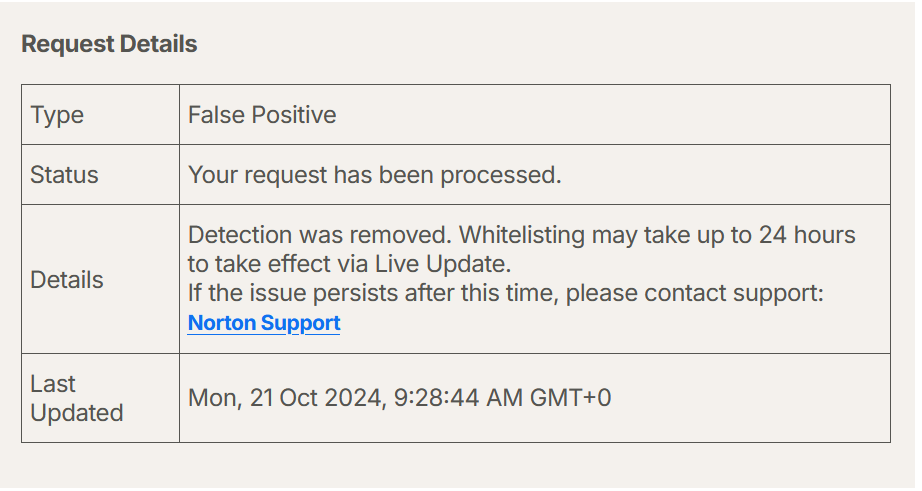
Norton responded with this message:
Status of request Id 8adf7ef1-3f49-4fbc-b7b0-73fbe6c23892 has been updated to closed with the following details: Detection was removed.
[Resolved] Windows Security Thinks 7.6.1.0 has a trojan
Conrad Sallian,
Support (Posts: 3210)
Oct 19, 2024 5:20:15 am EDT
Hi Terry,
Thank you for the screenshots. We've sent a FP report. We encourage you to send it as well. Norton has a very simple and user-friendly process of submitting an FP:
Submit FP to Norton
Thank you for the screenshots. We've sent a FP report. We encourage you to send it as well. Norton has a very simple and user-friendly process of submitting an FP:
Submit FP to Norton
[Resolved] Windows Security Thinks 7.6.1.0 has a trojan
Conrad Sallian,
Support (Posts: 3210)
Oct 18, 2024 5:28:16 am EDT
Hello Terry,
Our latest builds are not infected. When Norton removes their false positive detection and we publish their response here, will you acknowledge that your suspicions were unfounded?
Please, let us know the detection name and the module which is detected. A screenshot will also work.
Thank you.
Our latest builds are not infected. When Norton removes their false positive detection and we publish their response here, will you acknowledge that your suspicions were unfounded?
Please, let us know the detection name and the module which is detected. A screenshot will also work.
Thank you.
FYI and Bug report for Viewer 7.62
Conrad Sallian,
Support (Posts: 3210)
Oct 17, 2024 2:42:27 pm EDT
Thank you for the information. We've sent a FP report to them. By the way, here is the email address that can be reached at report@sentinelone.com . You are encouraged to send an FP too.
Thanks.
Thanks.
FYI and Bug report for Viewer 7.62
Conrad Sallian,
Support (Posts: 3210)
Oct 17, 2024 1:54:57 pm EDT
Hello John,
Nothing is missing. The file, it seems, is just deleted by your antivirus software.
What a/v software do you use on the Viewer machine?
P.S. Yes, you are correct. The rutserv.exe in Viewer assets folder is used for MSI Configuration.
Nothing is missing. The file, it seems, is just deleted by your antivirus software.
What a/v software do you use on the Viewer machine?
P.S. Yes, you are correct. The rutserv.exe in Viewer assets folder is used for MSI Configuration.
[Resolved] Windows Security Thinks 7.6.1.0 has a trojan
Conrad Sallian,
Support (Posts: 3210)
Oct 17, 2024 10:45:31 am EDT
Hello Terry,Terry Crawford wrote:
Norton is also blocking 7.6.1.0 and 7.6.2.0. Really need to get this fixed.
Have you tried sending a false positive report to Norton so that they fix their mistake?
[Resolved] Windows Security Thinks 7.6.1.0 has a trojan
Conrad Sallian,
Support (Posts: 3210)
Oct 17, 2024 6:13:44 am EDT
Yes, please send a message to support@remoteutilities.com , we will send you a link to download the previous release.Salgau Aurel wrote:
i will try to reach bitdefender team but until then i need to install an older version that does not have this problem.
can you provide a link with version 7.6.0? or 7.6.1?
Thank you,
Aurel.
P.S. We have also submitted a FP request to BitDefender.