Pauline's community posts
IP-Filter - Whitelist

Hello Klaus,
Thank you for your message.
Could you please confirm if you're adding the entries to the IP-filters the following way?
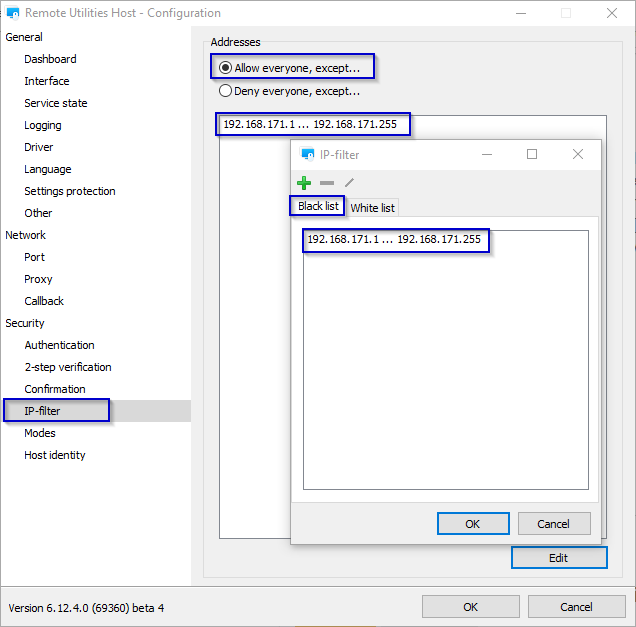
1. Click Allow everyone, except, then press the Edit button to invoke the IP-filter window.
2. In the invoked IP-filter window navigate to the corresponding Black list tab and add the singe IP address entry or an IP range that you want to block from accessing the Host.
3. Click OK to apply changes.
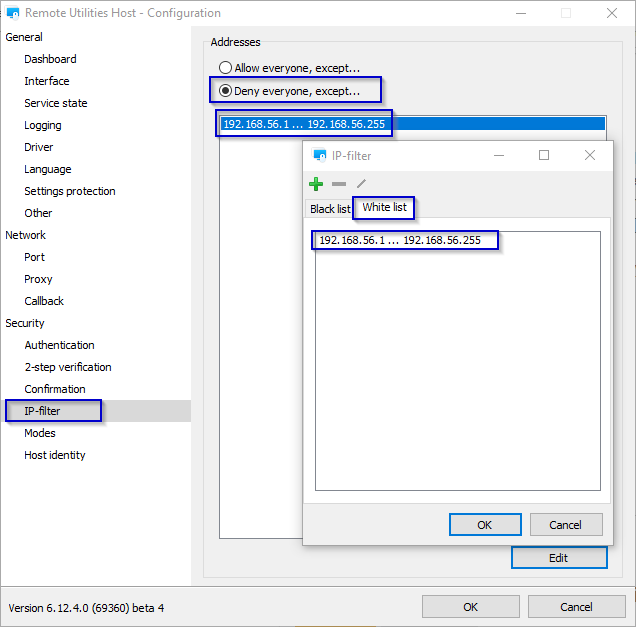
The same process applies to the Deny everyone, except option and the corresponding White list tab. For example, please see the setup on the screenshots below:
In addition, in case if you already follow the procedure above but the issue persists, please try updating Remote Utilities to the latest 6.12 Beta 4 version and see if this helps to resolve the issue.
The latest 6.12 Beta 4 version is available for download on this page.
When updating Remote Utilities, please make sure to update both Host and Viewer to the same version in order to avoid the version mismatch that might lead to performance issues or some features not working.
Hope that helps.
Thank you for your message.
Could you please confirm if you're adding the entries to the IP-filters the following way?
1. Click Allow everyone, except, then press the Edit button to invoke the IP-filter window.
2. In the invoked IP-filter window navigate to the corresponding Black list tab and add the singe IP address entry or an IP range that you want to block from accessing the Host.
3. Click OK to apply changes.
The same process applies to the Deny everyone, except option and the corresponding White list tab. For example, please see the setup on the screenshots below:
In addition, in case if you already follow the procedure above but the issue persists, please try updating Remote Utilities to the latest 6.12 Beta 4 version and see if this helps to resolve the issue.
The latest 6.12 Beta 4 version is available for download on this page.
When updating Remote Utilities, please make sure to update both Host and Viewer to the same version in order to avoid the version mismatch that might lead to performance issues or some features not working.
Hope that helps.
Remote Utilities showing not online
Hello John,
Thank you for your suggestion.
As Mike correctly noted, we already provide such solution - it's RU Server that can be deployed in a completely isolated environment and makes your set up completely independent from our servers.
We actually already have a few video-tutorials published on our website (like the program registration tutorial here, for example) and we definitely plan to publish a series of videos that explain how to set up different program features, including the detailed tutorials on setting up the RU Server. Unfortunately, we cannot provide any specific ETA on the videos yet, but we will try to make them available as soon as possible.
However, we also have extensive Documentation on the RU Server in text format, you can find all information on how to set up the Server here. In addition, in the latest Beta versions of RU, we've implemented a number of features, such as Port Manager for the RU Server. You can find more information on these features in this blog post as well.
Mike, thank you for the input!
Hope that helps.
Thank you for your suggestion.
As Mike correctly noted, we already provide such solution - it's RU Server that can be deployed in a completely isolated environment and makes your set up completely independent from our servers.
We actually already have a few video-tutorials published on our website (like the program registration tutorial here, for example) and we definitely plan to publish a series of videos that explain how to set up different program features, including the detailed tutorials on setting up the RU Server. Unfortunately, we cannot provide any specific ETA on the videos yet, but we will try to make them available as soon as possible.
However, we also have extensive Documentation on the RU Server in text format, you can find all information on how to set up the Server here. In addition, in the latest Beta versions of RU, we've implemented a number of features, such as Port Manager for the RU Server. You can find more information on these features in this blog post as well.
Mike, thank you for the input!
Hope that helps.
Beta testing: Remote Utilities for macOS/Linux
Hello Daniel,
Thank you for your message.
Some minor connectivity issues might temporarily occur in the nearest time, however, we're doing our best to eliminate the issue completely as soon as possible, so the connectivity with our public servers goes back to normal.
We apologize for the inconvenience.
Please let us know if you have other questions.
Thank you for your message.
Yes, unfortunately, according to our preliminary data, the connectivity issue might be caused by a DDoS attack. We're currently taking all necessary defensive measures to neutralize the attack.Is there a reason why today I am having issues connecting to any remote?
Some minor connectivity issues might temporarily occur in the nearest time, however, we're doing our best to eliminate the issue completely as soon as possible, so the connectivity with our public servers goes back to normal.
We apologize for the inconvenience.
Please let us know if you have other questions.
Remote Utilities showing not online
Hello everyone,
Thank you for your patience.
According to our preliminary data, the connectivity issue might be caused by a DDoS attack. We're currently taking all necessary defensive measures to neutralize the attack.
Some minor connectivity issues might temporarily occur in the nearest time, however, we're doing our best to eliminate the issue as soon as possible, so the connectivity with our public servers goes back to normal.
We apologize for the inconvenience and for the possible additional connectivity issues that might be occurring.
Please let us know if you have other questions.
Thank you for your patience.
According to our preliminary data, the connectivity issue might be caused by a DDoS attack. We're currently taking all necessary defensive measures to neutralize the attack.
Some minor connectivity issues might temporarily occur in the nearest time, however, we're doing our best to eliminate the issue as soon as possible, so the connectivity with our public servers goes back to normal.
We apologize for the inconvenience and for the possible additional connectivity issues that might be occurring.
Please let us know if you have other questions.
Remote Utilities showing not online
Remote Utilities showing not online
Remote Utilities showing not online
Hello Martin,
Thank you for your message.
I've forwarded this issue to our development department and asked them to look into this as soon as possible. I'll get back to you soon with their reply and keep you updated on the issue.
Sorry for the inconvenience.
Thank you for your message.
I've forwarded this issue to our development department and asked them to look into this as soon as possible. I'll get back to you soon with their reply and keep you updated on the issue.
Sorry for the inconvenience.
decent free tool but can't get it to work with domain
Hello Danyael,
Thank you for your message.
Before we can proceed to further troubleshooting, please try referring to this KB guide that provides solutions for the most common issues that might affect Internet-ID connectivity and cause similar issues and see if any solution from the list helps.
In case if the solutions above did not help to resolve the issue, then please feel free to send us the Host logs for examination. The Host logs are located in the following directory:
C:\Program Files (x86)\Remote Utilities - Host\Logs\
You can send the log files to support@remoteutilities.com. Please do not publish the logs on the forum as they are considered to be personal information.
Looking forward to your reply.
Thank you for your message.
Before we can proceed to further troubleshooting, please try referring to this KB guide that provides solutions for the most common issues that might affect Internet-ID connectivity and cause similar issues and see if any solution from the list helps.
In case if the solutions above did not help to resolve the issue, then please feel free to send us the Host logs for examination. The Host logs are located in the following directory:
C:\Program Files (x86)\Remote Utilities - Host\Logs\
You can send the log files to support@remoteutilities.com. Please do not publish the logs on the forum as they are considered to be personal information.
Looking forward to your reply.
Change of email address
Change of email address
Hello Brant,
Thank you for your message.
This occurs since the license key is associated with the email address it was generated for, rather than the email address in the account on our website. In case if you will not have access to your old email address anymore, you can simply generate a new license key that will be associated with your new email address using the Free License Key generator. As for your old license key - we will block the old key on our side, so it won't be active anymore.
This way, you will have only one license key associated with your active email and this will not violate our EULA.
Hope that helps.
Thank you for your message.
This occurs since the license key is associated with the email address it was generated for, rather than the email address in the account on our website. In case if you will not have access to your old email address anymore, you can simply generate a new license key that will be associated with your new email address using the Free License Key generator. As for your old license key - we will block the old key on our side, so it won't be active anymore.
This way, you will have only one license key associated with your active email and this will not violate our EULA.
Hope that helps.