Conrad Sallian's community posts
mac viewer?

Thank you for your message.
We send a newsletter about major upgrades to all existing customers so you will receive a message from us anyway. We may not send a newsletter about minor releases (to avoid bothering customers) , but a Mac version will definitely qualify as a major release.As a current Pro license holder will we automatically receive a notification when the Mac host is released or will we need to keep checking the website manually to see when it's released?
As for when the Mac version is going to be available, I can only say that our developers are currently working on it, so it's our highest/current priority now.
Don't hesitate to ask me if you have other questions.
Sorting in Viewer 6.7.0.2 no longer working..
Thank you for your message.
Do you have Use group view enabled on the View tab in Options? That helps you first group (online, offline etc.) and then sort within groups.I had entries in the Viewer sorted by Connection name in ascending (alphabetical) order prior to upgrading to version 6.7.0.2. Now when opening the Viewer, all Online connections under the General address book are in some random order. Offline/Unknown connections are still in alphabetical order by Connection name. If I click on a Folder and back to the General address book, they return to alphabetical order.
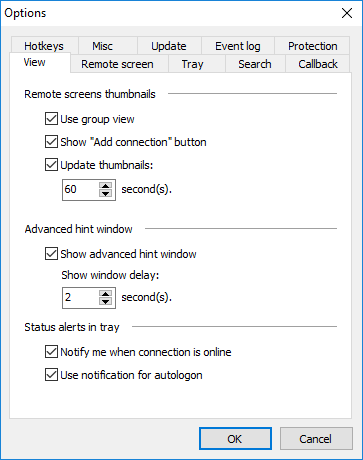
That's for pointing at this issue. We'll see if we can fix it.Now the additional problem. If I connect to a system that is Online, it moves to Logged on group. When I log off, it goes to the end of the list of Online connections. It no longer goes back to it's place in alphabetic order. Connect and Logoff, it's at the end of the list.
Printing blank pages
If you can see the preview on the Viewer side, then it should print without a problem, as this is nothing more than sending a PNG file to your printer in a standard way.
Try to print something else on your printer directly. For example, a PNG file. Or you can also use the Save button in the preview window to save the file first and then print it.
Thanks.
Printing blank pages
When printing, do you see the page preview in this window - see screenshot ?
Looking forward to your reply.
Printing blank pages
Shading/Redraw Changes?
error- language file not found
We have checked once again - there is no problem switching to Chinese Traditional in the Viewer interface, and to any other language.
Looks like there is some issue with accessing files in your Program Files folder. Try to run Viewer installation as administrator.
Hope that helps.
Shading/Redraw Changes?
Reporting Abuse?
Thank you for your post.
Virtually any remote control software can be abused this way. The most obvious course of action would be to send a complaint to the hosting provider where a site or a forum with illegitimate build is hosted.
If the file is distributed on the Stream platform, there must be a user account associated with it, or several accounts. Perhaps, it would be best to send a complaint to the Steam abuse team so that they block the account and take appropriate measures.
It could also help if you sent us the details and specifics, so that we can investigate this issue on our own. You can send the specifics to me via a private message here or to the email support@remote-utilities.com.
Thanks!
RemoteAgent - Remote Restart?
Hello Allan,Allan Hall wrote:
Tried to find this feature today and could not. Still working on it?
Allan
There is a check box in the Agent window called "Run after reboot":
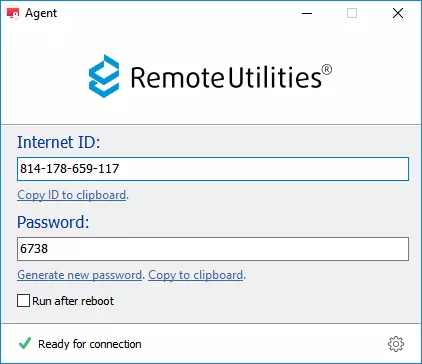
You need to check that and then reboot as normal - either directly using the Windows Start menu -> Restart etc. on the remote desktop, or by using the Power Control mode. If the above mentioned checkbox is set, the Agent should restart after the reboot.
Hope that helps.