Pauline's community posts
portable viewer saving .rdp files in C:\Users\user01\AppData\Roaming\R

Hello,
Thank you for your patience and additional information.
I've checked on the issue with our developers - the issue might be occurring if the file license.txt was somehow removed from the Portable Viewer's folder. Could you please double-check if the license.txt file is present in your Portable Viewer folder? In case if you cannot locate the file license.txt in the Portable Viewer folder and it was somehow removed - please try unzipping the .zip archive with Portable Viewer to your computer once again (you can unzip it to another directory on your machine or simply delete the previous folder) and see if this helps to resolve the issue.
In case if you need to re-download Portable Viewer, its latest version 7.0.2.0 is available on this page.
Hope that helps.
Thank you for your patience and additional information.
I've checked on the issue with our developers - the issue might be occurring if the file license.txt was somehow removed from the Portable Viewer's folder. Could you please double-check if the license.txt file is present in your Portable Viewer folder? In case if you cannot locate the file license.txt in the Portable Viewer folder and it was somehow removed - please try unzipping the .zip archive with Portable Viewer to your computer once again (you can unzip it to another directory on your machine or simply delete the previous folder) and see if this helps to resolve the issue.
In case if you need to re-download Portable Viewer, its latest version 7.0.2.0 is available on this page.
Hope that helps.
Blank host screen feature does not work
Hello Kaelyn,
Thank you for your patience.
I've checked with our developers on this and one of the reasons this issue might be occurring is if Windows OS is not updated to its latest build. Could you please double-check if your Windows is updated to the latest version on both Host and Viewer machine? Here's how you can check if there are any updates are available for your Windows:
1. Click on the Windows Start button in the taskbar, then navigate to: Settings -> Update & Security -> Windows Update.
2. Alternatively, you can click the Check for Windows updates button on this Microsoft help page.
After you've updated your machines to the latest Windows build, please try connecting to the remote Host once again and see if this helped to resolve the issue.
Hope that helps.
Thank you for your patience.
I've checked with our developers on this and one of the reasons this issue might be occurring is if Windows OS is not updated to its latest build. Could you please double-check if your Windows is updated to the latest version on both Host and Viewer machine? Here's how you can check if there are any updates are available for your Windows:
1. Click on the Windows Start button in the taskbar, then navigate to: Settings -> Update & Security -> Windows Update.
2. Alternatively, you can click the Check for Windows updates button on this Microsoft help page.
After you've updated your machines to the latest Windows build, please try connecting to the remote Host once again and see if this helped to resolve the issue.
Hope that helps.
portable viewer saving .rdp files in C:\Users\user01\AppData\Roaming\R
Hello,
Thank you for the clarification.
I will forward this issue to our developers along with the provided details and will ask them to look into it in case if we can identify what might be causing the issue. Sorry for the inconvenience.
I'll get back to you with an update on the issue shortly.
Thank you for the clarification.
I will forward this issue to our developers along with the provided details and will ask them to look into it in case if we can identify what might be causing the issue. Sorry for the inconvenience.
I'll get back to you with an update on the issue shortly.
portable viewer saving .rdp files in C:\Users\user01\AppData\Roaming\R
Hello,
Thank you for the clarification.
Could you please also let me know if when uninstalling Viewer, have you simply deleted it from Windows "Apps and features" menu or have you performed a complete uninstallation as described here?
Looking forward to your reply.
Thank you for the clarification.
Could you please also let me know if when uninstalling Viewer, have you simply deleted it from Windows "Apps and features" menu or have you performed a complete uninstallation as described here?
Looking forward to your reply.
Start host
Hello John,
Thank you for your message.
Unfortunately, there's no such feature to start Host remotely in case if it's not running on a remote machine, i.e. Host Start must be initiated by a user. In addition, perhaps, this KB article might provide some helpful information.
Hope that helps.
Thank you for your message.
Unfortunately, there's no such feature to start Host remotely in case if it's not running on a remote machine, i.e. Host Start must be initiated by a user. In addition, perhaps, this KB article might provide some helpful information.
Hope that helps.
portable viewer saving .rdp files in C:\Users\user01\AppData\Roaming\R
Hello,
Thank you for your message.
Unfortunately, we couldn't reproduce the issue - rdp connections are saved in the respective "rdp_connections" subfolder in the Portable Viewer's folder. Could you please let us know where do you store your Portable Viewer, e.g. if it's just a folder on your computer or USB drive?
Looking forward to your reply.
Thank you for your message.
Unfortunately, we couldn't reproduce the issue - rdp connections are saved in the respective "rdp_connections" subfolder in the Portable Viewer's folder. Could you please let us know where do you store your Portable Viewer, e.g. if it's just a folder on your computer or USB drive?
Looking forward to your reply.
Set default printer to Remote Utilities Printer
Hello André,
Thank you for your message.
Could you please clarify if you mean that the "Remote Utilities printer" driver is not present in the Devices and Printers window on your Host machine? If this is the case, please double-check if the printer is displayed as installed in the Host Settings -> Driver tab (i.e. the "Install" button should be inactive)?
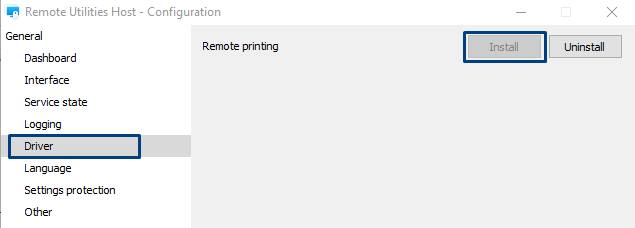
In case if the printer driver is not installed yet, please try installing it by selecting the "Install" button. In case if you've previously already installed the printer driver, but it somehow got removed from the Host machine - this might have been caused by some antivirus/firewall software activity. In this case, please try adding your Host installation folder to the antivirus/firewall software section list as described here and then try installing the printer driver once again.
Hope that helps.
Thank you for your message.
Could you please clarify if you mean that the "Remote Utilities printer" driver is not present in the Devices and Printers window on your Host machine? If this is the case, please double-check if the printer is displayed as installed in the Host Settings -> Driver tab (i.e. the "Install" button should be inactive)?
In case if the printer driver is not installed yet, please try installing it by selecting the "Install" button. In case if you've previously already installed the printer driver, but it somehow got removed from the Host machine - this might have been caused by some antivirus/firewall software activity. In this case, please try adding your Host installation folder to the antivirus/firewall software section list as described here and then try installing the printer driver once again.
Hope that helps.
Site does not generate correct RSS feeds?
Hello,
Thank you for letting us know.
I'll forward this information to our webmaster once again and will ask them to investigate this further. Sorry for the inconvenience.
I will let you know once it's fixed or if there are any other updates on this issue.
Thank you for letting us know.
I'll forward this information to our webmaster once again and will ask them to investigate this further. Sorry for the inconvenience.
I will let you know once it's fixed or if there are any other updates on this issue.
Custom Server Security Authentication Error
Hello Eric,
Thank you for your message and sorry for the late reply.
Could you please let us know the following information:
1. Are you able to sign in on the RU Server in your Viewer?
2. Do you have a "Force custom server security" checkbox enabled in the user's settings on the Server side?
3. Were the permission for your user added as a permission for a group or for a user only?
4. Last but not least, please double-check that this user or group are granted access in the Host settings as described here.
Looking forward to your reply.
Thank you for your message and sorry for the late reply.
Could you please let us know the following information:
1. Are you able to sign in on the RU Server in your Viewer?
2. Do you have a "Force custom server security" checkbox enabled in the user's settings on the Server side?
3. Were the permission for your user added as a permission for a group or for a user only?
4. Last but not least, please double-check that this user or group are granted access in the Host settings as described here.
Looking forward to your reply.
Connection through VPN
Hello,
Thank you for your message and sorry for the late reply.
Perhaps, the issue might be caused by the Cisco software blocking the ports required for Remote Utilities to work correctly. Could you please double-check if the following ports are opened when the Cisco VPN is enabled on the remote machine (perhaps, you might need to check with the network administrator):
1. Inbound TCP port 5650 for Direct connection.
2. Outbound TCP ports 5655 or 443 for Internet-ID connection.
For more information on ports used by Remote Utilities please see this page.
In addition, perhaps this troubleshooting guide might provide some helpful information.
Hope that helps.
Thank you for your message and sorry for the late reply.
Perhaps, the issue might be caused by the Cisco software blocking the ports required for Remote Utilities to work correctly. Could you please double-check if the following ports are opened when the Cisco VPN is enabled on the remote machine (perhaps, you might need to check with the network administrator):
1. Inbound TCP port 5650 for Direct connection.
2. Outbound TCP ports 5655 or 443 for Internet-ID connection.
For more information on ports used by Remote Utilities please see this page.
In addition, perhaps this troubleshooting guide might provide some helpful information.
Hope that helps.