Pauline's community posts
Keyboard assignments

Hello David,
Thank you for the provided details.
Could you please also clarify if there's any antivirus/firewall software installed on the machines where the issue occurs? Were the Host machines restarted after the Host installation?
Also, here's a relatable Community thread that might be helpful.
Looking forward to your reply.
Thank you for the provided details.
Could you please also clarify if there's any antivirus/firewall software installed on the machines where the issue occurs? Were the Host machines restarted after the Host installation?
Also, here's a relatable Community thread that might be helpful.
Looking forward to your reply.
Show screen to agent
Keyboard shortcuts for Get/Set remote clipboard
Can not connect to host after set up static ip on the host computer
Hello Sherry,
Thank you for the clarification.
I added the Host to my Viewer just to check if it's online and can connect to our servers - it's shown to be offline all the time. Could you please try uninstalling the Host completely following this complete uninstallation guide? Please note, that the Host's settings will be wiped as well.
Then reboot the Host machine and install the latest Host version from scratch.
Also, please update the Viewer to the most recent version as well. The version mismatch between Viewer and Host may lead to performance issues and some features not working.
Upgrading to the latest version is highly recommended because the issue you are having may have already been fixed in the latest update/patch.
Please let me know if the issue persists after you've updated Remote Utilities to the latest version.
Thank you for the clarification.
I added the Host to my Viewer just to check if it's online and can connect to our servers - it's shown to be offline all the time. Could you please try uninstalling the Host completely following this complete uninstallation guide? Please note, that the Host's settings will be wiped as well.
Then reboot the Host machine and install the latest Host version from scratch.
Also, please update the Viewer to the most recent version as well. The version mismatch between Viewer and Host may lead to performance issues and some features not working.
Upgrading to the latest version is highly recommended because the issue you are having may have already been fixed in the latest update/patch.
Please let me know if the issue persists after you've updated Remote Utilities to the latest version.
Computer Locked
Help with RU Server
Hello Aaron,
Thank you for your message.
Could you please send us the log files from the Host and the Viewer? Here's how to locate the log files: Host logs and the Viewer logs.
You can send them to support@remoteutilities.com. Please do not publish the logs on the forum, they are considered personal information.
Looking forward to your reply.
Thank you for your message.
Could you please send us the log files from the Host and the Viewer? Here's how to locate the log files: Host logs and the Viewer logs.
You can send them to support@remoteutilities.com. Please do not publish the logs on the forum, they are considered personal information.
Looking forward to your reply.
Can not connect to host after set up static ip on the host computer
Hello Sherry,
Thank you for your message.
Could you please clarify what version of Remote Utilities is used? The latest version is 6.10.10.0 as of this writing. Please try updating both Host and Viewer to the latest version and see if the issue persists.
The latest version is available for the download here.
Hope that helps.
Thank you for your message.
Could you please clarify what version of Remote Utilities is used? The latest version is 6.10.10.0 as of this writing. Please try updating both Host and Viewer to the latest version and see if the issue persists.
The latest version is available for the download here.
Hope that helps.
Keyboard assignments
No launch icon after installing Host version
Android limited hosts
Hello Romeu,
Thank you for your message.
As Conrad mentioned above, there's no limitation on the number of records for the mobile Viewer. All entries are stored on the device and available when you tap the three dots in the address line:
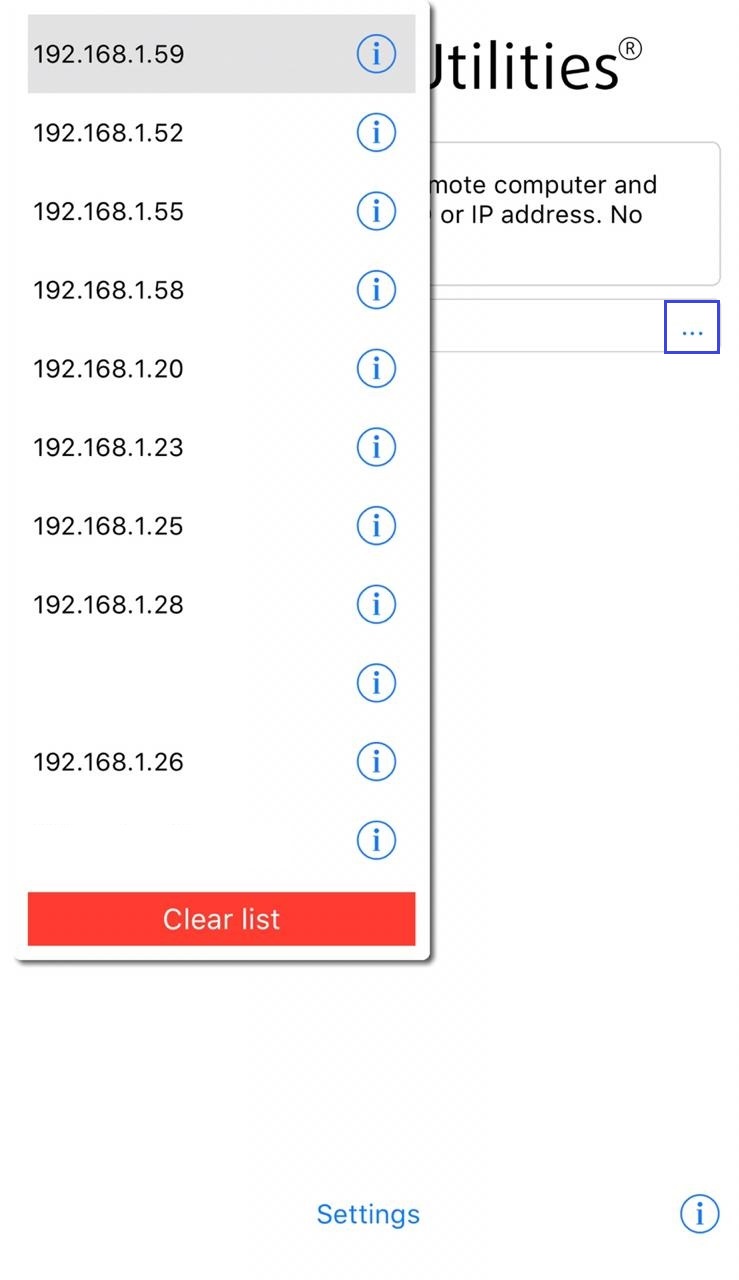
However, we plan to implement a full-fledged address book for mobile Viewer in our future updates.
Hope that helps.
Thank you for your message.
As Conrad mentioned above, there's no limitation on the number of records for the mobile Viewer. All entries are stored on the device and available when you tap the three dots in the address line:
However, we plan to implement a full-fledged address book for mobile Viewer in our future updates.
Hope that helps.