Community
Viewer 7.6.2.0 stuck on loading screen across 3 PCs simultaneously
Links used in this discussion
Panos Karmiris,
User (Posts: 1)
Aug 10, 2026 10:35:02 am EDT
Support level: Free or trial
ello,
I am experiencing a sudden issue where my Remote Utilities Viewer is getting permanently stuck on the loading screen when trying to connect to my Hosts on Windows 11.
Here are the specifics of my setup and the issue:
Viewer Version: 7.6.2.0 (Windows)
Scope: This failure happened simultaneously across 3 different computers. It was working perfectly, and then abruptly stopped on all of them at the exact same time.
Troubleshooting so far: My internet connection is stable. I do not use any third-party antivirus or firewall software, only the default Windows Security (Microsoft Defender).
Because this happened on 3 separate machines at the exact same time, could this be a recent Windows Defender definition update blocking the Internet-ID connection? Has anyone else experienced a sudden block on version 7.6.2.0 recently?
Any guidance on resolving this would be greatly appreciated. Thank you!
I am experiencing a sudden issue where my Remote Utilities Viewer is getting permanently stuck on the loading screen when trying to connect to my Hosts on Windows 11.
Here are the specifics of my setup and the issue:
Viewer Version: 7.6.2.0 (Windows)
Scope: This failure happened simultaneously across 3 different computers. It was working perfectly, and then abruptly stopped on all of them at the exact same time.
Troubleshooting so far: My internet connection is stable. I do not use any third-party antivirus or firewall software, only the default Windows Security (Microsoft Defender).
Because this happened on 3 separate machines at the exact same time, could this be a recent Windows Defender definition update blocking the Internet-ID connection? Has anyone else experienced a sudden block on version 7.6.2.0 recently?
Any guidance on resolving this would be greatly appreciated. Thank you!

Hello Panos,
Thank you for your message.
Before we proceed with further troubleshooting, please make sure to update Remote Utilities to the most recent version 7.8.4.0 following this guide. If the issue still persists after the update, please let us know.
Hope that helps.
Thank you for your message.
Before we proceed with further troubleshooting, please make sure to update Remote Utilities to the most recent version 7.8.4.0 following this guide. If the issue still persists after the update, please let us know.
Hope that helps.

Conrad Sallian,
Support (Posts: 3232)
Aug 11, 2026 1:22:25 pm EDT
Hello Panos,
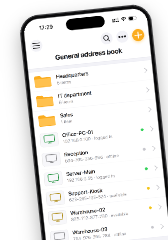
Please, check this first: in the Viewer address book, does the thumbnail for a stuck connection show the live remote screen? And on the same Host, do File Transfer or Task Manager mode open normally?
I would also suggest that you should try to update to the most recent version as Pauline suggested above. If the problem is resolved after that then it was one of those smaller issues fixed in the recent updates.
Hope that helps.
Please, check this first: in the Viewer address book, does the thumbnail for a stuck connection show the live remote screen? And on the same Host, do File Transfer or Task Manager mode open normally?
- If yes, this isn't a connectivity problem at all. The session is established and only the Full Control window never receives a frame, which makes it a screen capture failure. The fix is to turn on "Use legacy capture mode" in the Host's Other settings and restart the Host.
- If no, and the Hosts sit offline or every mode fails the same way, then it's the relay path and your Defender assumption is the right place to look. You should get the Host log from one of the affected machines first; it names the failure directly.
It could be althought we didn't receive any reports of this kind recently.could this be a recent Windows Defender definition update blocking the Internet-ID connection?
I would also suggest that you should try to update to the most recent version as Pauline suggested above. If the problem is resolved after that then it was one of those smaller issues fixed in the recent updates.
Hope that helps.
* Website time zone: America/New_York (UTC -4)