Community
Released: the all-new mobile app for iOS and Android
Links used in this discussion
Links used in this discussion
- https://www.remoteutilities.com/blog/remote-utilities-mobile-app-review-2026/
- https://apps.apple.com/app/remote-utilities/id793320970
- https://play.google.com/store/apps/details?id=com.remoteutilities.mviewer
- https://www.remoteutilities.com/download/mac.php
- https://www.remoteutilities.com/download/linux.php
Benny Tucker,
User (Posts: 59)
Sep 02, 2026 8:02:33 pm EDT
Support level: Plus
I just thought that I would post a couple of notes that someone might find useful. In Conrad's blog highlighting the new RU app, He mentioned that the bluetooth keyboards were not supported as of yet. I have found however, that if you click on the keyboard in the quick action menu, that you can type all you want in a normal Windows application. I have been invoking the keyboard fr om the quick action menu, and then minimizing the keyboard wh ere only the "F" and special keys are showing. That let's you have access to most of the normal desktop except the very bottom edge.
Also, it might be helpful for others to know that a bluetooth mouse also works very will in this app. I have found that the touch option in the quick action menu works best for this. It doesn't recognize right mouse clicks, but for all intents and purposes, it works great for pointing on the remote screen in this way.
Hope this helps someone.
Also, it might be helpful for others to know that a bluetooth mouse also works very will in this app. I have found that the touch option in the quick action menu works best for this. It doesn't recognize right mouse clicks, but for all intents and purposes, it works great for pointing on the remote screen in this way.
Hope this helps someone.

Conrad Sallian,
Support (Posts: 3267)
Sep 03, 2026 11:41:09 am EDT
Hi Benny,
Thank you for your feedback.
While some features may work if you connect a bluetooth mouse, still there's no full support for it and we are working on it (and the keyboard). We'll definitely add full support for both as soon as we can.
Thanks.
Thank you for your feedback.
While some features may work if you connect a bluetooth mouse, still there's no full support for it and we are working on it (and the keyboard). We'll definitely add full support for both as soon as we can.
Thanks.
Rob Chouinard,
User (Posts: 8)
Sep 15, 2026 11:51:33 am EDT
Support level: Free or trial
Huge upgrade from what you had before. I will update my rating on the app.
On the Android app, I cannot connect to any hosts through a self-hosted server. I created a new discussion about this to keep it out of this thread.
On the Android app, I cannot connect to any hosts through a self-hosted server. I created a new discussion about this to keep it out of this thread.
Conrad Sallian,
Support (Posts: 3267)
Sep 15, 2026 12:48:00 pm EDT
Hi Rob,
Yes, I've answered in that thread, thanks. Indeed that part of the UI needs to be improved (and it's definitely a UI problem) - we'll make sure we release an update as soon as possible.
Yes, I've answered in that thread, thanks. Indeed that part of the UI needs to be improved (and it's definitely a UI problem) - we'll make sure we release an update as soon as possible.
David Thackeray,
User (Posts: 1)
Sep 18, 2026 2:28:14 am EDT
Support level: Free or trial
Hi Conrad,
Application access protection
Can I request a feature - add the option to enable a password, pin or biometric security login before being able to access the application.
Some lazy folk like me want to save their passwords to their connections.
Cheers
Application access protection
Can I request a feature - add the option to enable a password, pin or biometric security login before being able to access the application.
Some lazy folk like me want to save their passwords to their connections.
Cheers
Conrad Sallian,
Support (Posts: 3267)
Sep 18, 2026 6:01:04 am EDT
Hi David,
Thank you for your message.
Yes, this feature is a candidate for our nearest update. We are planning to add it very soon.
Thank you for your message.
Yes, this feature is a candidate for our nearest update. We are planning to add it very soon.
Conrad Sallian,
Support (Posts: 3267)
Sep 20, 2026 3:34:30 pm EDT
Hello everyone,
We've updated the mobile app — it should be available in both stores very soon. Version 14.2.1 adds an app lock with a PIN or Face ID (iOS) / biometrics (Android). If you're updating from an earlier 14.x version, go to Main menu → App lock to set your preferences.
We've also changed the Internet-ID server settings in connection properties — they now match the same screen in the desktop Viewer.
Once the update lands in the stores, give it a try and let us know how it goes. Thanks.
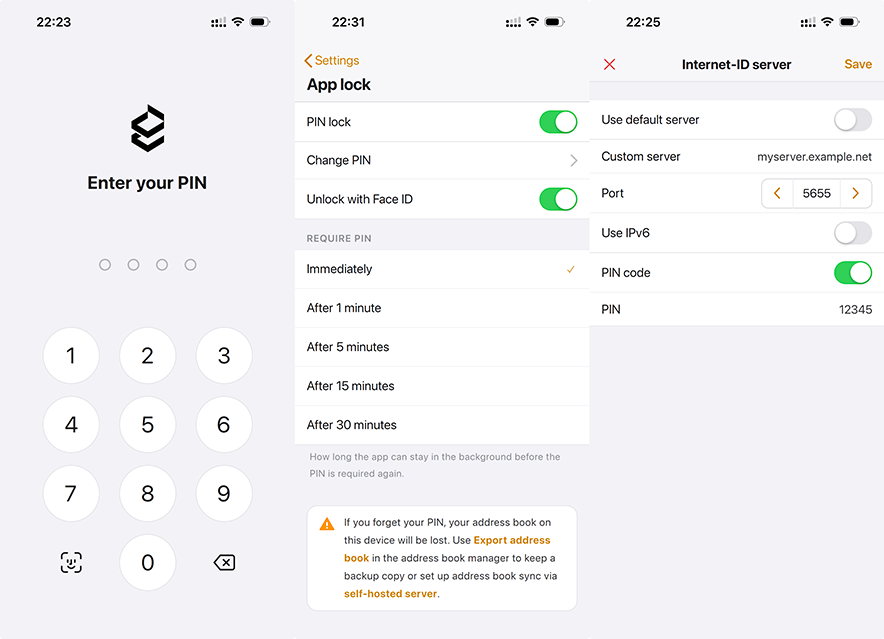
We've updated the mobile app — it should be available in both stores very soon. Version 14.2.1 adds an app lock with a PIN or Face ID (iOS) / biometrics (Android). If you're updating from an earlier 14.x version, go to Main menu → App lock to set your preferences.
We've also changed the Internet-ID server settings in connection properties — they now match the same screen in the desktop Viewer.
Once the update lands in the stores, give it a try and let us know how it goes. Thanks.
Carlos Thomas,
User (Posts: 20)
Sep 23, 2026 12:18:04 am EDT
Support level: Pro
Been waiting on this for some time now - finally here - and EXTREMELY grateful!
Hoping to see updates in future. Will leave feedback in store. Keep up the good work!
Hoping to see updates in future. Will leave feedback in store. Keep up the good work!
Perry Grobe,
User (Posts: 1)
Oct 12, 2026 12:46:50 pm EDT
Support level: Free or trial
I confess I have looked, but I cannot seem to find the answer I seek re: the newly released Android version of Remote Utilities.
There is no question that my older version has it's quirks and 'things I wish it would do better' on my Android 13 phone.
But it permits me to access a legacy network of machines effectively, and has done so for a little while. Your software has helped me to keep an elderly father online with hair on my head still remaining.
At the moment I have a working viewer solution (Remote Viewer Android ver 7.7.1) connected through my RUServer 2.6 on 64bit to various hosts all running Host 6.3.0.6.
The question I cannot seem to find is whether the new Android Viewer version will be able to connect to my existing older hosts. There are system requirements posted for the software operating systems etc, but I cannot seem to find a compatibility matrix with your existing versions posted that would have precluded having to ask this question through the forum.
Thank you for any insight you might provide.
There is no question that my older version has it's quirks and 'things I wish it would do better' on my Android 13 phone.
But it permits me to access a legacy network of machines effectively, and has done so for a little while. Your software has helped me to keep an elderly father online with hair on my head still remaining.
At the moment I have a working viewer solution (Remote Viewer Android ver 7.7.1) connected through my RUServer 2.6 on 64bit to various hosts all running Host 6.3.0.6.
The question I cannot seem to find is whether the new Android Viewer version will be able to connect to my existing older hosts. There are system requirements posted for the software operating systems etc, but I cannot seem to find a compatibility matrix with your existing versions posted that would have precluded having to ask this question through the forum.
Thank you for any insight you might provide.
Conrad Sallian,
Support (Posts: 3267)
Oct 14, 2026 10:00:48 am EDT
Hi Perry, hi Carlos
Thank you both for the kind words!
It might not work, unfortunatley, at least we don't guarantee stable work if there's that significant version mismatch. However, we encourage you to upgrade your hosts anyway - that will ensure that all the recent features will work and the software is stable.
Thanks!
Thank you both for the kind words!
The question I cannot seem to find is whether the new Android Viewer version will be able to connect to my existing older hosts. There are system requirements posted for the software operating systems etc, but I cannot seem to find a compatibility matrix with your existing versions posted that would have precluded having to ask this question through the forum.
Thank you for any insight you might provide.
It might not work, unfortunatley, at least we don't guarantee stable work if there's that significant version mismatch. However, we encourage you to upgrade your hosts anyway - that will ensure that all the recent features will work and the software is stable.
Thanks!
* Website time zone: America/New_York (UTC -4)