Conrad Sallian's community posts
How to get WOL to restart RU Host on remote computer

Conrad Sallian,
Support (Posts: 3232)
Jan 08, 2021 7:06:58 am EST
Hi David,
Thank you for your message.
If it's the former then we should find the reason why the Host service fails because this is abnormal behavior. I.e. we should fix the root cause.
Thank you for your message.
When you say that the Host stops running do you mean that the Host service freezes/fails on the remote computer? Or just that the Host shows offline in your address book in Viewer? The latter can be caused by network connectivity issues , not necessarily by the Host itself being unresponsive.At times the host stops running and i cannot connect with the remote computer.
If it's the former then we should find the reason why the Host service fails because this is abnormal behavior. I.e. we should fix the root cause.
File transfer dont show remote files
Conrad Sallian,
Support (Posts: 3232)
Jan 07, 2021 7:22:00 am EST
Hi Samuel,
We can schedule a remote session then to help you resolve this issue since it is hard to tell without actually seeing what's going on.
Will you be available for a session? Please, create a ticket so that we can schedule a session time and receive access credentials from you. Please, do not share access credentials publicly on the forum.
We can schedule a remote session then to help you resolve this issue since it is hard to tell without actually seeing what's going on.
Will you be available for a session? Please, create a ticket so that we can schedule a session time and receive access credentials from you. Please, do not share access credentials publicly on the forum.
Windows Security Authorization error
Conrad Sallian,
Support (Posts: 3232)
Jan 06, 2021 8:24:50 am EST
Hello Jose,
Thank you for your message.
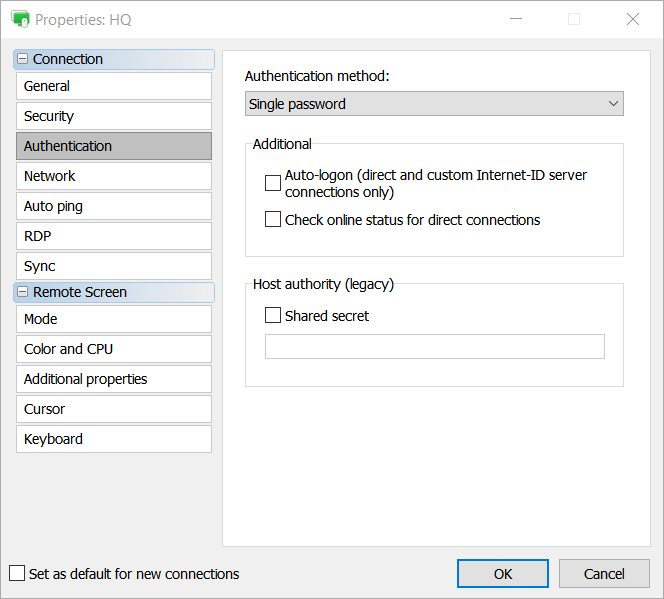
You should change the Auto to Single Password if you want to override the default program sequence:
See also this discussion.
Thank you for your message.
You should change the Auto to Single Password if you want to override the default program sequence:
See also this discussion.
Can't add free license key
Conrad Sallian,
Support (Posts: 3232)
Jan 05, 2021 12:22:52 pm EST
Hello Scott,
Thank you for your message.
You should reset your Viewer configuration file:
1. Fully exit the Viewer (File -> Exit).
2. Open C:\Users\<username>\AppData\Roaming\Remote Utilities Files\ folder. Note that the AppData folder may be hidden by default in which case you'll need to enable "Hidden files and folders" in Windows Explorer settings.
3. In the folder above locate the file config_4.xml and delete it.
4. Run the Viewer and re-register it with your license key.
Also, see if you still have your address book backups in that folder. This will let you restore your address book as described here.
Hope that helps.
Thank you for your message.
You should reset your Viewer configuration file:
1. Fully exit the Viewer (File -> Exit).
2. Open C:\Users\<username>\AppData\Roaming\Remote Utilities Files\ folder. Note that the AppData folder may be hidden by default in which case you'll need to enable "Hidden files and folders" in Windows Explorer settings.
3. In the folder above locate the file config_4.xml and delete it.
4. Run the Viewer and re-register it with your license key.
Also, see if you still have your address book backups in that folder. This will let you restore your address book as described here.
Hope that helps.
Blank Host Screen causes color degradation
Conrad Sallian,
Support (Posts: 3232)
Jan 05, 2021 12:07:05 pm EST
Hello Andy,
Are you running the latest beta on both ends? I.e. beta 4.
Are you running the latest beta on both ends? I.e. beta 4.
Connection Was Interrupted
Conrad Sallian,
Support (Posts: 3232)
Jan 05, 2021 3:39:23 am EST
We are going to release the stable version within a month from now.AsianEggrollM wrote:
Thank you for your reply. I will try that. Do you know when the beta will be pushed to a stable release?
Viewer logs into the local host
Conrad Sallian,
Support (Posts: 3232)
Jan 04, 2021 5:30:42 am EST
Hello,
Thank you for your message.
When attempting connection do you select the Full Control and View connection mode or RDP mode?
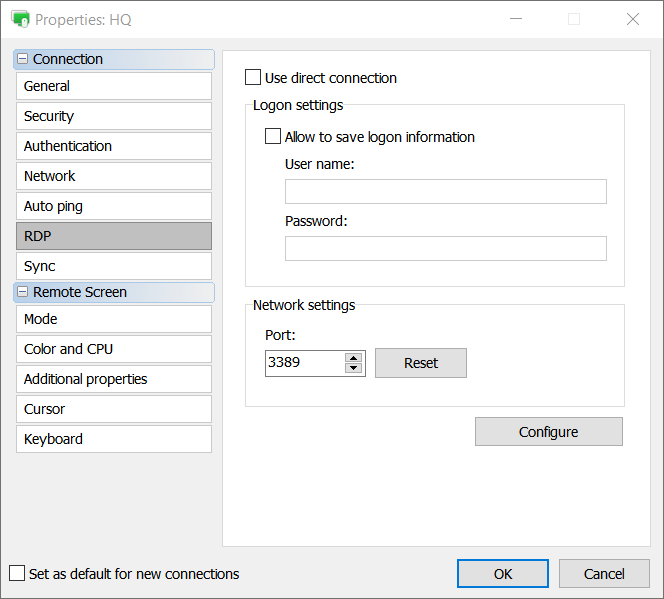
Please, note that the RDP mode just runs the native Microsoft RDP client for you. In order to change the login settings for that mode you can use the RDP tab in connection properties:
Thank you for your message.
When attempting connection do you select the Full Control and View connection mode or RDP mode?
Please, note that the RDP mode just runs the native Microsoft RDP client for you. In order to change the login settings for that mode you can use the RDP tab in connection properties:
Black Screen
Conrad Sallian,
Support (Posts: 3232)
Jan 04, 2021 5:25:20 am EST
Hello,
Thank you for your message.
Please, try the solutions on this page https://www.remoteutilities.com/support/kb/full-control-and-view-mode-isn-t-working-or-is-unstable/
Thank you for your message.
Please, try the solutions on this page https://www.remoteutilities.com/support/kb/full-control-and-view-mode-isn-t-working-or-is-unstable/
Connection Was Interrupted
Conrad Sallian,
Support (Posts: 3232)
Jan 04, 2021 5:21:38 am EST
Hello Brian,
Thank you for your message.
We can only recommend that you try the latest beta version (Viewer, Host and Server) and see if it fixes the issue. There have been a lot of improvements in this beta including fixes to connectivity issues on RU Server etc, see release notes.
You can download the beta from here https://www.remoteutilities.com/download/beta.php
Thank you for your message.
We can only recommend that you try the latest beta version (Viewer, Host and Server) and see if it fixes the issue. There have been a lot of improvements in this beta including fixes to connectivity issues on RU Server etc, see release notes.
You can download the beta from here https://www.remoteutilities.com/download/beta.php
Single Password vs RU Security
Conrad Sallian,
Support (Posts: 3232)
Jan 04, 2021 5:13:58 am EST
Hello Victor,
If multiple authentication methods are enabled on the remote Host (e.g. Single password, AND RU Security etc.) the program still uses one of them during a connection. Which one depends on your settings on the Viewer side -> Connection properties -> Authentication tab.
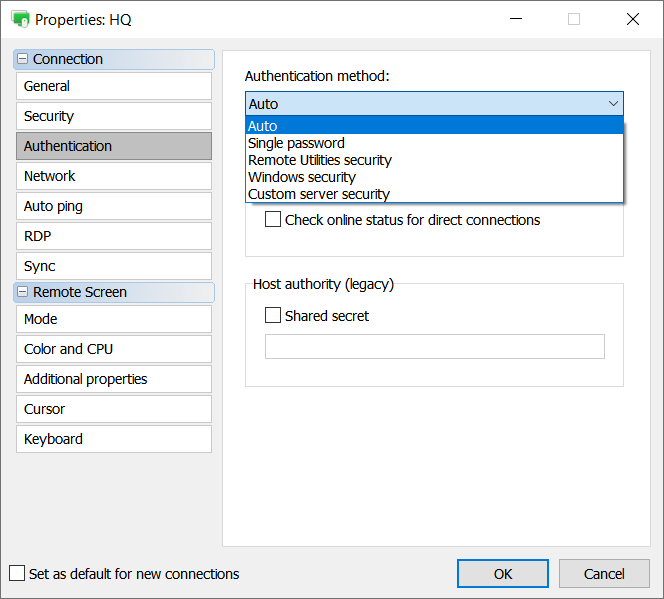
If Auto is set the Viewer uses the first available authentication method according to this order:
Custom Server Security (CSS)
Windows Security
Remote Utilities Security
Single password
As you can see, since you have enabled RU Security and Single password and have your auth method set to Auto, Viewer will always force RU Security when you authenticate.
To override this behavior for specific Hosts you just need to select the desired authentication method in the drop down list and Viewer will always use that. In your example just select Single password to override the automatic sequence check.
Hope that helps.
If multiple authentication methods are enabled on the remote Host (e.g. Single password, AND RU Security etc.) the program still uses one of them during a connection. Which one depends on your settings on the Viewer side -> Connection properties -> Authentication tab.
If Auto is set the Viewer uses the first available authentication method according to this order:
Custom Server Security (CSS)
Windows Security
Remote Utilities Security
Single password
As you can see, since you have enabled RU Security and Single password and have your auth method set to Auto, Viewer will always force RU Security when you authenticate.
To override this behavior for specific Hosts you just need to select the desired authentication method in the drop down list and Viewer will always use that. In your example just select Single password to override the automatic sequence check.
Hope that helps.