Pauline's community posts
Multi Monitor on remote and problems with Blank Screen

Hello Will,
Yes, here's a dedicated forum discussion.
However, before we can proceed to further troubleshooting please try referring to this KB troubleshooting article that covers the most common factors that might be causing such connectivity issues and might provide a helpful solution.
In addition, it seems like the issue might be caused by some antivirus/firewall software activity preventing the Host service from running. In this case, please try adding the Host installation folder to your antivirus/firewall exception list as described here.
Finally, in case if the solutions above did not help, please feel free to send us the Host logs for examination. You can send the log files to support@remoteutilities.com.
Hope that helps.
Yes, here's a dedicated forum discussion.
However, before we can proceed to further troubleshooting please try referring to this KB troubleshooting article that covers the most common factors that might be causing such connectivity issues and might provide a helpful solution.
In addition, it seems like the issue might be caused by some antivirus/firewall software activity preventing the Host service from running. In this case, please try adding the Host installation folder to your antivirus/firewall exception list as described here.
Finally, in case if the solutions above did not help, please feel free to send us the Host logs for examination. You can send the log files to support@remoteutilities.com.
Hope that helps.
Beta testing: Remote Utilities for macOS/Linux
Hello Rafael,
Thank you for your message.
Unfortunately, we cannot provide a specific ETA on the release of Host for Mac/Linux yet. We hope to release it by the end of this year and will do our best to provide Host for Mac/Linux as soon as we can.
Sorry for keeping you waiting.
Thank you for your message.
Unfortunately, we cannot provide a specific ETA on the release of Host for Mac/Linux yet. We hope to release it by the end of this year and will do our best to provide Host for Mac/Linux as soon as we can.
Sorry for keeping you waiting.
Multi Monitor on remote and problems with Blank Screen
Hello Will,
Thank you for your message.
Hope that helps.
Thank you for your message.
Could you please elaborate a bit more on this? Do you mean the back/forth functionality provided by the additional buttons on a mouse? If this is the case, then unfortunately, this feature is yet to be implemented. However, we already have it in our wish-list and will make sure to add the support for extra buttons in our future updates.Also, the mouse back/forth functions on the remote mouse are not being sent over to the host, was this ever supported?
Unfortunately, this is a known issue that is caused by a new blank screen mechanism specific features - the "driver method" was discontinued since the 6.12.2.0 Beta 2 version as it is outdated and soon won't be supported by Windows at all. Besides, the new method is more versatile - namely, it works on laptops without blocking out the brightness controls (whereas the driver method has such a problem). Unfortunately, there are some downsides like the degraded colors when the blank remote screen feature is enabled. However, we'll do our best to improve the feature in our future updates.It turns out that the discoloration is coming from the blank screen option on my end, as soon as I disable it the display returns to normal.
Yes, we provide paid licenses as well which include different support levels and support channels. Please note that we provide technical support in EST timezone; from 9:00am to 5:00pm, Monday to Friday only. However, we try our best to respond as fast as we can. For more information on average response time for different support levels, including the Free license users, please refer to our Support Policy page.Is there a paid version of the software? We'd like to get faster response similar to [censored] , specially during the "work from home" period.
Hope that helps.
Multi Monitor on remote and problems with Blank Screen
Hello James,
Thank you for the provided photos.
I'll get back to you with their reply as soon as the issue is reviewed. Sorry for the inconvenience.
Thank you for the provided photos.
Of course, I've forwarded the issue regarding the remote cursor behavior to our developers once again and asked for their input on this.I think if the mouse was NOT moving, (or was changed to a single pixel, something like that). most people would be fooled by the very-dark overlay being applied and ignore the screens.
I'll get back to you with their reply as soon as the issue is reviewed. Sorry for the inconvenience.
Hiding the Active Connections box
Hello David,
Thank you for your message.
Do you mean this notification panel?
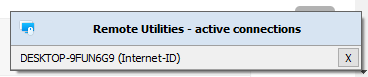
If this is the case, then the notification panel can be disabled in the Host/Agent settings -> on the Interface tab. Simply disable the Show notification panel checkbox, click OK and make sure to restart Agent/Host.
Hope that helps.
Thank you for your message.
Do you mean this notification panel?
If this is the case, then the notification panel can be disabled in the Host/Agent settings -> on the Interface tab. Simply disable the Show notification panel checkbox, click OK and make sure to restart Agent/Host.
Hope that helps.
Multi Monitor on remote and problems with Blank Screen
Hello James,
Thank you for your patience.
I've checked with our developers on the issue - unfortunately, this is expected behavior which is also enhanced by the brightness settings of the remote monitors. However, we will try to improve the blanking screen feature in our future updates in order to make the monitors in the multimonitor setup darker.
Meanwhile, in case if you do have the brightness levels adjusted on the remote monitors - please try resetting the brightness level to the default values and see if this helps to resolve the issue.
Hope that helps.
Thank you for your patience.
I've checked with our developers on the issue - unfortunately, this is expected behavior which is also enhanced by the brightness settings of the remote monitors. However, we will try to improve the blanking screen feature in our future updates in order to make the monitors in the multimonitor setup darker.
Meanwhile, in case if you do have the brightness levels adjusted on the remote monitors - please try resetting the brightness level to the default values and see if this helps to resolve the issue.
Hope that helps.
Multi Monitor on remote and problems with Blank Screen
Hello James,
Thank you for the update and the provided details.
We will forward this to our development department for a review to see if we can reproduce the issue and do anything to fix it.
I will get back to you as soon as I get a reply from our developers and will keep you updated on the issue.
Thank you for the update and the provided details.
We will forward this to our development department for a review to see if we can reproduce the issue and do anything to fix it.
I will get back to you as soon as I get a reply from our developers and will keep you updated on the issue.
Host and Agent availability for Linux and Mac
Hello Thomas,
Thank you for your message.
Unfortunately, we cannot provide a more specific ETA on the release of Host for Mac/Linux yet. We hope to release it by the end of this year and will do our best to provide Host for Mac/Linux as soon as we can. Sorry for the inconvenience.
Meanwhile, as a temporary alternative, please consider using Host on Linux Mint via Wine - we've previously received feedback from our other users who were successfully using Remote Utilities on Linux machines using Wine.
Hope that helps.
Thank you for your message.
Unfortunately, we cannot provide a more specific ETA on the release of Host for Mac/Linux yet. We hope to release it by the end of this year and will do our best to provide Host for Mac/Linux as soon as we can. Sorry for the inconvenience.
Meanwhile, as a temporary alternative, please consider using Host on Linux Mint via Wine - we've previously received feedback from our other users who were successfully using Remote Utilities on Linux machines using Wine.
Hope that helps.
Multi Monitor on remote and problems with Blank Screen
Hello James,
Thank you for your input.
Yes perhaps, the issue might have been caused by something contained in the Windows update. However, it only makes sense to try updating to the latest 6.12.2.0 Beta 2 version first to see if the issue still persists when using the latest version, as in the 6.12.2.0 Beta 2 version we've replaced the monitor blanking mechanism and discontinued the Monitor driver, as well as the method of fetching the list of displays in the multiple monitor configurations is different from the previous versions. In addition, we plan to implement the ability to map remote monitors to local ones in our future updates.
Hope that helps.
Thank you for your input.
Yes perhaps, the issue might have been caused by something contained in the Windows update. However, it only makes sense to try updating to the latest 6.12.2.0 Beta 2 version first to see if the issue still persists when using the latest version, as in the 6.12.2.0 Beta 2 version we've replaced the monitor blanking mechanism and discontinued the Monitor driver, as well as the method of fetching the list of displays in the multiple monitor configurations is different from the previous versions. In addition, we plan to implement the ability to map remote monitors to local ones in our future updates.
Hope that helps.
Multi Monitor on remote and problems with Blank Screen
Hello Will,
Thank you for your message.
Could you please clarify what version of Remote Utilities do you use? In case if you use version 6.10.10.0.or an older version, please try updating to the latest 6.12.2.0 Beta 2 version and see if the issue persists, as in this version we've replaced the previous screen blanking mechanism that utilized the Monitor driver. For more information please see the Release Notes.
The latest 6.12.2.0 Beta 2 version is available for the download on this page. When updating Remote Utilities please make sure to update both Viewer and Host/Agent (as well as the RU Server if used) to the same version as the version mismatch might lead to performance issues or some features not working.
Hope that helps.
Thank you for your message.
Could you please clarify what version of Remote Utilities do you use? In case if you use version 6.10.10.0.or an older version, please try updating to the latest 6.12.2.0 Beta 2 version and see if the issue persists, as in this version we've replaced the previous screen blanking mechanism that utilized the Monitor driver. For more information please see the Release Notes.
The latest 6.12.2.0 Beta 2 version is available for the download on this page. When updating Remote Utilities please make sure to update both Viewer and Host/Agent (as well as the RU Server if used) to the same version as the version mismatch might lead to performance issues or some features not working.
Hope that helps.