Community
Keyboard layout (spanish) equivalences
Links used in this discussion
Links used in this discussion
Stephen Sherratt,
User (Posts: 2)
Jan 14, 2019 9:00:58 am EST
Support level: Free or trial
Windows 10, 6.103
Hi
Viewer PC: Windows in spanish, keyboard Spanish layout
Host PC: Windows in english UK, keyboard Spanish layout
To get accented characters áéíóú on a spanish layout requires first pressing ´ (nothing is displayed) followed by the required letter. The accented letter is then displayed: á
On the host pc, the ' is displayed as soon as it is pressed.
When the letter is pressed, it displays the unaccented letter. so the two characters are displayed like this
´a
ñ works as it is a single key.
regards
Steve
Hi
Viewer PC: Windows in spanish, keyboard Spanish layout
Host PC: Windows in english UK, keyboard Spanish layout
To get accented characters áéíóú on a spanish layout requires first pressing ´ (nothing is displayed) followed by the required letter. The accented letter is then displayed: á
On the host pc, the ' is displayed as soon as it is pressed.
When the letter is pressed, it displays the unaccented letter. so the two characters are displayed like this
´a
ñ works as it is a single key.
regards
Steve

Conrad Sallian,
Support (Posts: 3276)
Jan 16, 2019 4:44:55 am EST
Hello Stephen,
If this is the latest version of Remote Utilities, please try enabling "Use legacy keyboard input model" in connection properties:
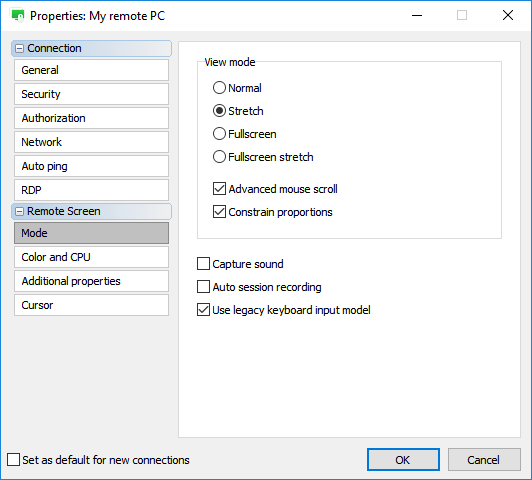
Let us know if the issue persists.
If this is the latest version of Remote Utilities, please try enabling "Use legacy keyboard input model" in connection properties:
Let us know if the issue persists.
Stephen Sherratt,
User (Posts: 2)
Jan 16, 2019 8:32:17 am EST
Support level: Free or trial
That corrected the problem,
many thanks.
many thanks.
Support level: Free or trial
6 years later, the "Use legacy keyboard input model" option is not there anymore.
Viewer Language: English (US)
Viewer Keyboard: United states-International Layout
Remote Language: Spanish (Latin America)
Remote Keyboard: Spanish (Latin America)
When I type from the viewer PC controlling the remote connection, it does not transmit the key I am pressing, but the key on the remote keyboard.
For example, the @ is not showing when I type Shift+2, instead it shows "
Also the ' is not working and shows the same behavior as mentioned on this threat six years ago.
Viewer Language: English (US)
Viewer Keyboard: United states-International Layout
Remote Language: Spanish (Latin America)
Remote Keyboard: Spanish (Latin America)
When I type from the viewer PC controlling the remote connection, it does not transmit the key I am pressing, but the key on the remote keyboard.
For example, the @ is not showing when I type Shift+2, instead it shows "
Also the ' is not working and shows the same behavior as mentioned on this threat six years ago.

Hello,
Thank you for your message.
Could you please try switching the keyboard input method to Unicode - this can be done in the Connection properties menu -> Keyboard tab. After enabling the feature, try logging off the remote Host and see if the issue still persists after reconnecting to the Host.
Let us know if this works for you.
Thank you for your message.
Could you please try switching the keyboard input method to Unicode - this can be done in the Connection properties menu -> Keyboard tab. After enabling the feature, try logging off the remote Host and see if the issue still persists after reconnecting to the Host.
Let us know if this works for you.
Support level: Free or trial
It was the first thing I tried.
Same result
Same result
* Website time zone: America/New_York (UTC -4)