Conrad Sallian's community posts
Running Host and Agent simultaneously possible?

Conrad Sallian,
Support (Posts: 3216)
Dec 31, 2018 7:57:42 am EST
Hello Trent,
Thank you for your questions.
Note that the Agent will have different access credentials and other settings than the Host because the two programs keep their settings in registry entries/keys and can co-exist on the same computer.
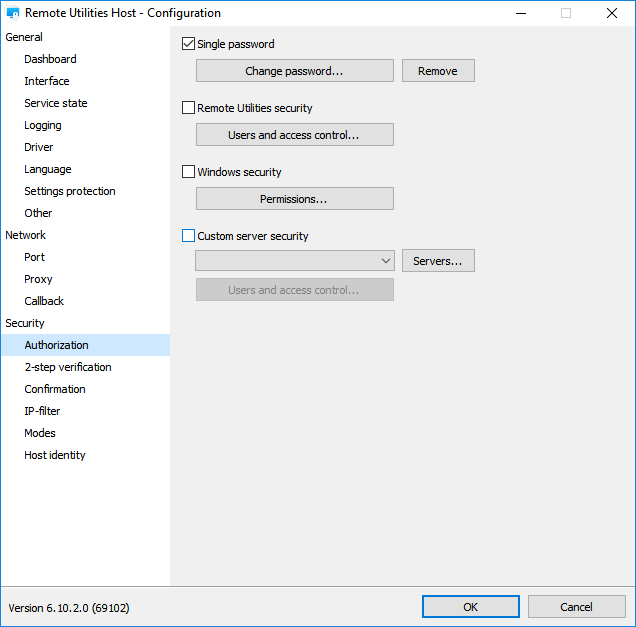
There are different ways to access the Host settings:
1. Right click on the running Host icon in the system tray and select "Settings for Host".
2. Windows Start menu -> Remote Utilities Host -> Settings for Host.
3. Using command line option: rutserv.exe /config
With the last two options you can open the settings without the Host service actively running.
Hope that helps.
Thank you for your questions.
No, the Agent won't be running simultaneously with the Host. However, you don't necessarily have to have the remote user uninstall the Host. They can simply stop Host using the right-click menu ("Stop Host" item). Once the Host has been stopped, they can run the Agent.So I am wondering, is it possible to run the Agent simultaneously with the Host?
Note that the Agent will have different access credentials and other settings than the Host because the two programs keep their settings in registry entries/keys and can co-exist on the same computer.
If they need to change authorization settings for the installed Host, they must run "Settings for Host" and navigate to Authorization:If no, what would be the recommended best practices for walking a user through granting access through a Host without disturbing the existing configuration (assuming they are already using Single Password)?
There are different ways to access the Host settings:
1. Right click on the running Host icon in the system tray and select "Settings for Host".
2. Windows Start menu -> Remote Utilities Host -> Settings for Host.
3. Using command line option: rutserv.exe /config
With the last two options you can open the settings without the Host service actively running.
Hope that helps.
Certains keys and key combinations not working in 6.10.2.0 for me
Conrad Sallian,
Support (Posts: 3216)
Dec 31, 2018 5:40:16 am EST
Hello Trent,
It is. Deep inside these two versions are much closer to each other than to 6.8.0.1.Interestingly it appears that downgrading the Viewer is the best workaround for the moment. The 6.9.4.0 Viewer appears to be forward compatible with 6.10.2.0 hosts (at least for basic remote control... I have not tested other functionality such as file transfer, chat, voice and video, etc).
Certains keys and key combinations not working in 6.10.2.0 for me
Conrad Sallian,
Support (Posts: 3216)
Dec 30, 2018 5:32:58 pm EST
Hello Trent,
Thank you for the report. Yes, it's a known bug which was reported yesterday. We will release a quick fix (6.10.3.0) in a couple of days. Meanwhile, we'll be testing your reported key combinations as well.
Let us know if you find anything else.
Thank you for the report. Yes, it's a known bug which was reported yesterday. We will release a quick fix (6.10.3.0) in a couple of days. Meanwhile, we'll be testing your reported key combinations as well.
Let us know if you find anything else.
Agent 6.10 file size
Conrad Sallian,
Support (Posts: 3216)
Dec 30, 2018 4:05:44 pm EST
Hello Dave,
As compared with version 6.8 yes, the sizes became bigger. Mostly because we stopped using a specific sfx technology, added openssl encryption etc.
As compared with version 6.8 yes, the sizes became bigger. Mostly because we stopped using a specific sfx technology, added openssl encryption etc.
Frequent disconnects
Conrad Sallian,
Support (Posts: 3216)
Dec 28, 2018 5:08:48 pm EST
Hello Thierry ,
This error means that the Host cannot connect to the intermediary relay server. There should be other errors in addition to that one. Could you please send us the complete log at support@remote-utilities.com.
Thanks.
This error means that the Host cannot connect to the intermediary relay server. There should be other errors in addition to that one. Could you please send us the complete log at support@remote-utilities.com.
Thanks.
Frequent disconnects
Conrad Sallian,
Support (Posts: 3216)
Dec 28, 2018 7:36:03 am EST
Hi Thierry ,
Steps to fix connectivity issues (or rather pointers that help understand where to look at) are available in our knowledge base:
Cannot connect using Internet-ID connection
Cannot connect using direct connection
The primary source where to look at whenever you have any connectivity issues is the Host log. Does it have any errors?
Steps to fix connectivity issues (or rather pointers that help understand where to look at) are available in our knowledge base:
Cannot connect using Internet-ID connection
Cannot connect using direct connection
The primary source where to look at whenever you have any connectivity issues is the Host log. Does it have any errors?
Frequent disconnects
Conrad Sallian,
Support (Posts: 3216)
Dec 28, 2018 7:33:11 am EST
Hello Alex,
Whenever you or anyone else has intermittent connectivity issues with Remote Utilities please note that there are two primary reasons that may apply:
1. Antivirus software or a firewall.
2. Network configuration problems (such as a faulty or incorrectly setup router, or TCP/IP configuration issues on the computer, or DNS issues etc.).
Whenever you or anyone else has intermittent connectivity issues with Remote Utilities please note that there are two primary reasons that may apply:
1. Antivirus software or a firewall.
2. Network configuration problems (such as a faulty or incorrectly setup router, or TCP/IP configuration issues on the computer, or DNS issues etc.).
Ever since upgrading
Conrad Sallian,
Support (Posts: 3216)
Dec 27, 2018 5:33:29 pm EST
Hello John,
Thank you for your message.
It looks like the host lost connectivity with our intermediary server. We need to examine the Host log to know for sure. You can find the Host logs in the Host installation directory .
Feel free to zip the logs and send them over to us at support@remote-utilities.com
Thank you for your message.
It looks like the host lost connectivity with our intermediary server. We need to examine the Host log to know for sure. You can find the Host logs in the Host installation directory .
Feel free to zip the logs and send them over to us at support@remote-utilities.com
Cannot properly upgrade from 6.3.0.6 to 6.9.4.0
Conrad Sallian,
Support (Posts: 3216)
Dec 26, 2018 6:23:06 am EST
Hello Jack,
Update on this issue. Your setup was most likely correct, it's only that when updating old versions - and 6.3.0.6 is a very old version given how many changes we have made ever since it was released - the new password won't apply due to changes to authorization mechanism.
So if you want to change the password with your update you are advised to do that beforehand in the Host settings, and then update.
Hope that helps.
Update on this issue. Your setup was most likely correct, it's only that when updating old versions - and 6.3.0.6 is a very old version given how many changes we have made ever since it was released - the new password won't apply due to changes to authorization mechanism.
So if you want to change the password with your update you are advised to do that beforehand in the Host settings, and then update.
Hope that helps.
Remote Sound is loud static
Conrad Sallian,
Support (Posts: 3216)
Dec 26, 2018 5:44:50 am EST
Hello Jack,
It could help to see a screenshot of your speakers properties. Please, refer to this forum thread, the second page.
It could help to see a screenshot of your speakers properties. Please, refer to this forum thread, the second page.